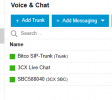
WAN Block—After 2nd account registration over SBC. Yealink W73H Wireless base and phones

it worked before the WAN block
 
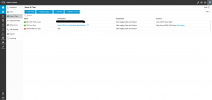
See attached
 

Attachments

  • Screenshot 2025-09-17 105039.png
    Screenshot 2025-09-17 105039.png
    34.6 KB · Views: 1
You need to check your firewall from your router, not your firewall of the pc. The SBC needs to connect to the pbx, there is no way around.
 
What about the actual device from your ISP? Is it allowing all the ports needed in/out?
 
  • Like
Reactions: bitn2
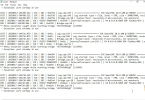
On windows you can check the SBC log file at:
C:\ProgramData\3CXSBC\Logs\3cxsbc.log

Please open this and share anything interesting - please mask any username/passwords and public IPs that might be in it.
 
  • Like
Reactions: bitn2
On windows you can check the SBC log file at:
C:\ProgramData\3CXSBC\Logs\3cxsbc.log

Please open this and share anything interesting - please mask any username/passwords and public IPs that might be in it.
1758113336220.png
 
the funny thing is that my extensions are registered so there should be connection to the 3xc cloud
Are you using a supported IP phone and connected via the SBC, or using a generic, untested, unsupported device connected manually?
 
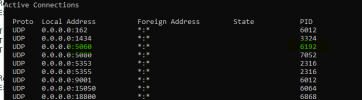
Based on that log file, you have some other software already running on that PC that uses port 5060 UDP and so blocks the SBC.

We recommend that you use a dedicated PC for the SBC to avoid such issues.
 
Based on that log file, you have some other software already running on that PC that uses port 5060 UDP and so blocks the SBC.

We recommend that you use a dedicated PC for the SBC to avoid such issues.
1758113855117.png1758114006289.png1758114022575.png
after clearing that PID it now works thanks
 
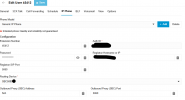
A generic IP phone is not supported. Since you entered the details manually on the phones, they are not actually going through the SBC, but rather connected directly, which is why you are receiving the WAN Block messages. You need to check the guide on how to connect the supported base station to 3CX after fixing the SBC connection: https://www.3cx.com/sip-phones/yealink-dect-phones/
 
Thank you for that info was looking in the wrong direction TCP instead of UDP
 
my issue now is that the number i tried to phone is busy...? any guidance to look for in troubleshooting this?
 
You must factory reset the base station and then connect it via the FXS DECT section, as per the guide. Afterwards, you can reconfigure the handsets to the base station.
 

Members Online Now

Forum statistics

Threads
111,831
Messages
589,277
Members
164,660
Latest member
RJenkinsROCK