Solved Want to connect my Current 3CX to a Cloud Service for more Storage

Status
Not open for further replies.

chimac07

Premier Customer
Joined
Dec 8, 2021
Messages
14
Reaction score
0
I am currently using v18 version of 3CX and I set up my 3cx account not to have cloud storage. I have been using my 3CX for several years now and would like to transfer my current set-up to a cloud service, since I need more storage for my call recording. I see a lot of videos on how to set-up a new 3CX account on to a cloud service, but on videos on how to move an up and running 3CX account to a cloud service. Is it even possible to connect an up and running 3CX to have Cloud service to get more storage?
 
Hello,

Yes you can transfer any existing account that you have on Premises or Hosted with 3CX to a Self Hosted environment and vise versa for your own reasons.

You can also enable remote archiving in a Hosted environment and save your backups on your own location using FTP, SFTP or Google Storage

As 3CX we provide different size hosting environments based on your needs:
https://www.3cx.com/ordering/pricing/hosted-info/

If you decide to move a Hosted instance to your own Self Hosted site please contact us first in order to delete your Hosted instance. (if you keep two instances running at the same time will create issues.).
 
Last edited by a moderator:
Hello,

Yes you can transfer any existing account that you have on Premises or Hosted with 3CX to a Self Hosted environment and vise versa for your own reasons.

You can also enable remote archiving in a Hosted environment and save your backups on your own location using FTP, SFTP or Google Storage
As 3CX we provide different size hosting environments based on your needs:
https://www.3cx.com/ordering/pricing/hosted-info/

If you decide to move a Hosted instance to your own Self Hosted site please contact us first in order to delete your Hosted instance. (if you keep two instances running at the same time will create issues.).
Awesome! Is there an article or videos on how to enable remote archiving in a Hosted environment or saving backup using Google Storage?
 
Last edited by a moderator:
Awesome! Is there an article or videos on how to enable remote archiving in a Hosted environment or saving backup using Google Storage?
Hello!

To enable remote archiving go to the 'Backup & Restore' section on your Management Console then 'Location' and select Google Storage.
More info here .

For more information on how to configure your GC storage, I would highly recommend checking this guide
 
Hi @chimac07,

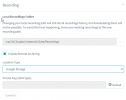
a small correction, to enable remote archiving for recordings go to Reporting, Recordings, Location, and then click Enable. The guides mentioned above are for storing your backups to a remote location.

1644524959792.png
 
Last edited by a moderator:
  • Like
Reactions: Evolute IT
Status
Not open for further replies.

Forum statistics

Threads
111,974
Messages
590,081
Members
164,899
Latest member
mazet