Solved WAVIX SIP Trunk config for Outbound calls

Status
Not open for further replies.

SEPACYBERTECH

Free User
Joined
Feb 1, 2023
Messages
5
Reaction score
1
Hi,

We have 3CX Self-hosted system on Windows located in Bulgaria with Standard license and currently using a SIP Trunk provider from Bulgaria with main trunk number (Bulgarian number like +35952XXXXXX) and several DIDs.
The case is to add additional SIP Trunk provider (WAVIX) from UK and when we are calling externally for example to Bulgaria or UK, the receiver of the call should see WAVIX's main trunk number which is +4420XXXXXXXX.

We already have a SIP Trunk service and registered main trunk number (+4420XXXXXXX) from WAVIX and it's configured in the 3CX system like main SIP Trunk in "Outbound rules" section, the status of the SIP Trunk is registered, the light is green in "SIP Trunks" section.
And the problem is when we made a call to Bulgaria (for example) the receiver still seeing the number from Bulgarian SIP Trunk (+35952XXXXXX). Any ideas from where this should be?

p.s. We already checked the guide for WAVIX - https://www.3cx.com/docs/sip-trunk/wavix/

Regards
 
And the problem is when we made a call to Bulgaria (for example) the receiver still seeing the number from Bulgarian SIP Trunk (+35952XXXXXX). Any ideas from where this should be?

Do you mean to say you made a call from Bulgaria to UK?

The order of the outbound rules matters. If the Bulgarian trunk outbound rules allow calls to UK, and it's higher in the list than the UK trunk rules, it will match first and your calls will go out from the Bulgarian trunk. The receiver will end up seeing that number as a result.
 
  • Like
Reactions: GeorgeP_3CX
Thanks for your reply,

To be honest I'm testing with calls from office environment in Bulgaria (where where the 3CX is) to mobile network in Bulgaria, but the case is no matter to where I'm calling, the receiver to see the UK number from WAVIX SIP Trunk.

The WAVIX (UK Trunk) is placed on the top of Outbound rules.
1675267777453.png
 

Attachments

  • 1675323048800.png
    1675323048800.png
    31.6 KB · Views: 14
  • Like
Reactions: YiannisH_3CX
Thank you very much for your help and given guides.
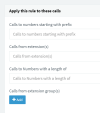
Yes, you were very correct and now I added the both SIP Trunks in one rule in Route1 and Route2, I guess should be clearer like this.
1675340868580.png

Anyway, still doesn't work, I mean that all calls going through the old A1 SIP and not from the WAVIX UK.
And I'd putted the Outbound Caller ID in Route1.
 
Based on the rule I see now (which is the only rule existing) the PBX will try to send the call through Route 1, and if its down, it will timeout and and fallback to route 2.

Just as a test, remove route 2. Leave a single rule which only allows Wavix calls.

Purge the Activity Log to clean it, then Make a call and if it fails you need to look at your logs to see the reason why the call failed.
 
This is the notification:
Call or Registration to 00395xxxxxxxxx@(Ln.10004@WAVIX UK) failed.
9x.2xx.8x.1x replied: 403 Please remove 0, country code first, E164 format; from IP:9x.2xx.8x.1x:5060

And this is the log file, the first attempt with "00359" directly closes the line and the second attempt with "+359" says "..the number you have dialed is not correct .."

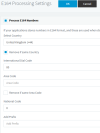
And this is the E164 Settings (also tried with turned off "Process E164 Numbers")
1675354109890.png
 

Attachments

Last edited:
The first attempt was invalid format, so they rejected it.

The second attempt you sent them an invalid number or a number you are not allowed to call. Why don't you just try dialing a +44 number instead?
 
Once you get the UK trunk working, you might consider setting up the rules so that any UK call can only use the UK trunk, and not use the Bulgarian trunk, as a back up. That way you won't be paying more for UK calls if and when the UK trunk fails, for some reason. You will also not be sending a Bulgarian phone number to the UK, and not be aware of this.
 
Finally, I made the configuration to work properly!

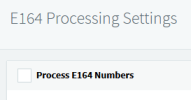
I switched off the E164 option in the System Settings
1675438675828.png

In Outbound rules added the Outbound number in E164 format like
1675438947916.png

And in the SIP Trunk configuration on all places putted the E164 format number like "+4420xxxxxxxx".

And after that everything was working fine.

Thank you for your replies and the support, guys!
 
  • Love
Reactions: JohnS_3CX
Great news! Happy to help!
 
  • Like
Reactions: SEPACYBERTECH
Status
Not open for further replies.

Members Online Now

No members online now.

Forum statistics

Threads
111,831
Messages
589,277
Members
164,660
Latest member
RJenkinsROCK