Solved Web client - No mic

Status
Not open for further replies.

CDI

Free User
Joined
Aug 27, 2020
Messages
7
Reaction score
0
Hi,

i have read a ton of posts with similiar issue, but i'm not be able to resolve the problem.

I'm try to call throght the webclient, from my notebook. When i call to an extension or *777 my voice is not sent.

Summary:
  1. 3cx system phone on google cloud
  2. 3cx system phone version 16.0.622
  3. setting/general: enable webRTC is checked
  4. firewall check with no problems
  5. notebook with windows 7 pro
  6. mic enabled, softwares can acquire mic (privacy settings)
  7. antivirus disables, windows firewall disabled
  8. browser settings allow use of cam and mic for https://domain/webclient and chrome extension.
  9. setting page of webclient shows correct hardware
  10. with chrome webclient, firefox webclient, chrome extension = my voice is not sent.
Same problem on other notebook with windows 10

I think that the problem is on system phone side, but how can i proceed?

Regards
 
Hi,

Check your mic on another site (Google: check my mic online) just to make sure that the mic+browser combo works.
 
Hi,

thanks for the answer.
I have checked my mic on www onlinemictest com with success.

I forgot:
11. top-right webclient selector: browser extension (chrome), webclient (firefox)

Regards
 
I'm using chrome with the plugin and had to downgrade Chrome to 84.0.4147.135 to make my mic works again. Fortunately, i'm using the portable version.
 
Last edited:
Ok that's good, and do generally not have the ability to pass voice via the webclient, or is it just your extension? How about other users?
 
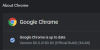
Ensure you are testing with this version of Chrome on Windows 10

1598537786597.png
 
I was just trying to give a solution to CDI. As for myself, it happened with the last chrome update (85.0.4183.83) on Windows 10. Got another extension today with the same problem. Made him downgrade chrome and it worked again. We are still using the 16.0.5.619 version as the update fails and our host is taking forever to apply the script to correct the repo issue ...
I was able to answer calls but couldn't ear anything when i was calling someone.
 
@Technic-Soft ok so you don't yet have the hotfix, so its normal that the new chrome wont work in this case. Let us know after the update is complete
 
Hi,

@JohnS_3CX, yes my version is: Version 85.0.4183.83 (Official Build) (64-bit)

I think that the issue is browser-version indipendet because i have the same problem using firefox and using old version of chrome or firefox, too.

Regards
 
I am seeing the same issue for multiple clients. All the Clients were working fine for the last year or so, then in the last 2 days I have received multiple calls on this issue.
I have found that the issue is with the new version of Chrome being pushed out. All of which the Chrome Version had been updated to 85.0.4183.83
I have had to connect them via Firefox to get them working again.
 
I am seeing the same issue for multiple clients. All the Clients were working fine for the last year or so, then in the last 2 days I have received multiple calls on this issue.
I have found that the issue is with the new version of Chrome being pushed out. All of which the Chrome Version had been updated to 85.0.4183.83
I have had to connect them via Firefox to get them working again.

Hi Rob, we released a hotfix that addresses this before update 6 came out (16.0.5.622).

Update 6 already includes the fixes to support the newer browser.
 
Hi,

can be that the issue depends by SIP trunk provider? even if echo number does not works.

Regards
 
The echo test should work regardless of provider, because it's an internal call.

Usually the problem will be the audio ports not being reachable, but you can debug the webclient call using this url chrome://webrtc-internals/ and looking at fields such as

createOfferOnSuccess and setLocalDescription - for your side

setRemoteDescription - for the PBX side
 
Hi,

how can i read these informations?
Can u help me?

Regards
 

Attachments

How many NICs does your Google Cloud machine have?
 
IP_OF_MY_PHONE_SYSTEM = the correct public IP of the PBX?
 
Hi,

i think that the cloud machine has 1 NIC (public side)
The IP 10.......4 is the internal google IP.
The IP_OF_MY_PHONE_SYSTEM is the public IP address obtainable pinging the domain.

Regards
 
Create a new extension, and send me the fqdn, user and pass in a private conversation.

I can try to test the extension from here and see if I can also hear the echo test.

We can identify if the problem is the server or the client side
 
Hi @CDI

I replied back to you, and it seems your ports are not open.

Run your firewall checker again please, and double-check your ports on the Google firewall (and the VM if needed)
 
Hi,

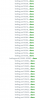
the checker shows only green marks. But it doesn't checks 10500-10600 ports (see attachment).

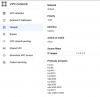
Into the google cloud firewall rules, i have edit the default pbx rule (see attachment) adding the 10500-10600 ports.

Now all seem to be working.

Regards
 

Attachments

  • 3cx_firewall.png
    3cx_firewall.png
    77.8 KB · Views: 11
  • google_cloud_old_firewall_rules.png
    google_cloud_old_firewall_rules.png
    35.5 KB · Views: 12
Status
Not open for further replies.