Web Client on Firefox refuses to accept speakers

Status
Not open for further replies.

NonLinearly

Free User
Joined
Jan 23, 2023
Messages
64
Reaction score
2
As a corporate policy we use Firefox (v113) as default web browser. But Firefox refuses to accept speakers when we login to 3cx web client. Microphone and camera are ok. We tested all other browsers and it worked (Edge,Chrome,Opera). IT IS VERY ANNOYING.
 
Hi,

When it comes to Firefox specifically, there is a limitation regarding the output.

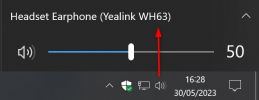
As opposed to other browsers, it will use the default Windows output. We don't have the ability to select custom speaker/ringer there unfortunately.

We can recommend our desktop app if you don't mind using 3CX outside of the browser, it gives you access to everything
1685452655647.png
 
"it will use the default Windows output"
Can you make it more clear please? If it will use the default Windows output then we have already set as default Windows output the desired output. So we should be hearing audio on this output!!!
 
Yes, I can explain a bit better:

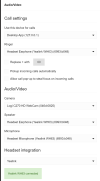
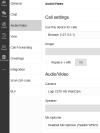
So in the browser you will notice that the Ringer and Speaker selection is grayed out (we cannot force firefox to select those).
1685453724405.png


In instead of the greyed out boxes, Firefox will use whatever you selected here in your operating system as both the Ringer, and the Speaker
1685453421013.png
 
  • Like
Reactions: NonLinearly
This is exactly what I mentioned before. Even though the specific output is selected in the Windows as you said, nothing is heard on it!!!
 
I had to set "Use this device for calls" to "Browser"
 
  • Like
Reactions: JohnS_3CX
Status
Not open for further replies.

Forum statistics

Threads
112,018
Messages
590,316
Members
164,963
Latest member
DenisK