Web configuration on port 5015 times out

Status
Not open for further replies.

d0325mgray

Customer
Joined
Apr 23, 2019
Messages
17
Reaction score
0
In preparation for migrating from a Google cloud host installation to Debian, I have installed 3CXPBX using these instructions..

https://www.3cx.com/docs/manual/installing-debian-linux-pbx/

My firewall allows port 5015 from any but when I try to connect to http://publicipaddress]:5015?v=3, it just times out. I also cannot telnet to that port

I will configure from the command line but I would like to know why this is not working
 
Last edited:
That was a typo. Edited the post. Thanks
 
Alright with that out of the way.

In your post, you mention that you allowed traffic 5015 from any, but have you also set up the NAT rule as well? This will translate the traffic from the public IP on port 5015 and point it to the local IP on port 5015.
 
No. I had not. I'll try that
 
You should also be carefull of how long you leave that rule up, as with that rule in place, and pointed to a non-configured 3cx instance, you effectively have a web interface that doesnt require login, exposed to the wide open world, in the security circles i would put a heavy snarking on someone who had done this.
 
@BrenttG Makes a great point.

Standard practice should be to only allow access to 5015 from the public IP address that you are connecting from to configure it. Then once the configuration is complete remove the rule so all traffic to 5015 will be denied.
 
This is the first time I have tried anything with Debian. I am more used to Ubuntu. Why is it that I am able to ssh to the public IP address but other apps need to be NATd
 
are you using 1:1 static NAT, if you are then you don't need port forwarding that may explain why your SSH is working without port forwarding.You said you moving away from Google cloud can I ask where did you migrate? is it still in cloud or on premise?
 
I have never set up any NAT rules. This is AWS so I created a Debian 9 instance from the marketplace and noticed that the eth0 interface shows the local address and not the public address.

I will migrate to AWS eventually
 
Once I decide to migrate, how do I completely delete the Google instance?
 
AWS Check list:

Make sure the subnet you placed your Debian instance is Public subnet, meaning it has a default route to internet gateway
Make sure your EC2 instance has a Public IP address assign to it in addition to private IP, you can use automatic Public IP assignment when creating instance or assign Elastic Public IP to the instance.

Please allow traffic to desire ports for inbound and outbound in ACL, please note ACL are stateless so you need to have rule for both direction. You can make the ACL allow all traffic in both direction and leave the security to security group which is a common practice.

Make sure the security group assigned to 3CX Debian instance allow all outbound traffic and allow require inbound traffic.

If you are able to SSH from remote PC but not open any other port including 5015 I think the issue is with the security group and ACL. More often people create rules in security group and forget about ACL.

Let me know how you go with this, I am happy to share some screen shots for Debian setup in AWS to help you out if you need further assistance.
 
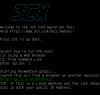
Normally it should look like this.


10379


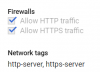
It runs on a plain http, not HTTPS so make sure that is allowed in your instance details.

10380

So now http://yourpublicip:5015?v=2 should be accessible
 
I discovered that 3CX has an image that I can activate on AWS which sets everything up for me. I wish I had discovered that before. Thanks for all the suggestions. I'm just going to terminate this instance and go with the one that works
 
Yes. That's what I already did.
 
Status
Not open for further replies.

Forum statistics

Threads
111,923
Messages
589,752
Members
164,796
Latest member
Dame24