web meeting webmeeting portal isn't working anymore any ideas?

Status
Not open for further replies.

[email protected]

Customer
Joined
Dec 29, 2011
Messages
4
Reaction score
0
we don't use the web meeting feature very often but never really had problems, but now its not working at all and I dont know why. I have rebooted the server and checked the diagnostic options on that troubleshooter page, it doesn't help that document seems to be outdated because not much of it matches the current state of the system even service names lol..
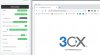
when we click on start a web meeting now it doesn't open. it goes to a troubleshooter URL
 
Last edited by a moderator:
Hi Kevin,

Actually it's not outdated, there is a specific case that must be triggered if you landed there.
Of special importance is the firewall configuration, and it's quite probable that the 3CX MCUs cannot reach your PBX, causing you to land on the troubleshooting page.

I also see from the screenshot that you are using a custom FQDN. Are your certificates valid?
If they are invalid the MCUs will again not be able to reach your PBX due to SSL failure.
 
Just to add a datapoint: An old meeting that was left "running" all the time still works. for us. New meetings won't work (everyone seems to get stuck in their own copy of the meeting - by themselves.) Tried the previous fix (disable click to meet, delete email, etc.) - not helping this time.
 
can you explain

" everyone seems to get stuck in their own copy of the meeting - by themselves "
 
  • Like
Reactions: Evolute IT
It's as weird as it sounds. We are each using the same URL to get to the meeting, but we are each the only ones in it when we get there.
 
Hi,

Are you sharing the Organizer URL or Participant URL by the way?

You need to join using the Organizer URL, but the participants should not use that one, they should user the Participant URL which is distinctly different
 
OK, I think I'm getting webmeeting and click2meet confused. Since (when they work) they seem to behave the same way, I thought they were 2 ways to get into the same thing... (Not the same meeting, but the same TYPE of meeting.) Apologies.
 
We are having a similar issue, web meetings are now showing two views of the users camera one is there name and one is "me" turning the camera off and on will remove the Named view from the main window until you hit the mute button which brings it back as well as screen sharing will show the 2 camera views and they are also flopped? Have been using webmeeting from the beginning and this is the first time the interface seems buggy? Same effect on all browsers on multiple machines. Recent Update has been the only change. ver: 16.0.655
Tried deleting the email with no effect, waring doing this will erase all scheduled meetings for the extension.
 
sorry I didn't get notifications of these comments, its still a problem I know the certificate is self signed I wondered if that was an issue but it never was before. is there a document for setting up a self signed certificate or another way to switch to a 3cx ssl without having to reconfigure all the phones and clients. the phones and all the clients point at 3cx.meritool.com
 
@[email protected] did you get a chance to check the certs yet?

It also might be important to note that we have been using 3cx for a long time our system is configured to use port 5001 for https. is this an issue? I know that when I have searched for webmeeting ports they say 443 and 40000 to 65535 UDP
 
The only way to change FQDN to a 3CX one, is to take a full backup (without FQDN), then release FQDN from your customer portal, and reinstall using your backup. You will be asked to select an FQDN during setup and you can pick a new one. Any local phones you have should not require reprovisioning, but any remote or SBC phones you have and all softclients (web, windows, mobile) will need to be reprovisioned unfortunately since they will no longer work. If this will be an issue, you have to find a way to renew your own certs or better yet plan ahead to switch to a 3CX FQDN which solves the issue permanently.


Port 5001 should be perfectly fine. This document covers everything regarding ports
https://www.3cx.com/docs/ports/
1605860400635.png

And here you can also find additional info about what needs to be allowed (similar to above)
https://www.3cx.com/user-manual/video-conferencing/troubleshoot/
 
The only way to change FQDN to a 3CX one, is to take a full backup (without FQDN), then release FQDN from your customer portal, and reinstall using your backup. You will be asked to select an FQDN during setup and you can pick a new one. Any local phones you have should not require reprovisioning, but any remote or SBC phones you have and all softclients (web, windows, mobile) will need to be reprovisioned unfortunately since they will no longer work. If this will be an issue, you have to find a way to renew your own certs or better yet plan ahead to switch to a 3CX FQDN which solves the issue permanently.


Port 5001 should be perfectly fine. This document covers everything regarding ports
https://www.3cx.com/docs/ports/
View attachment 19197

And here you can also find additional info about what needs to be allowed (similar to above)
https://www.3cx.com/user-manual/video-conferencing/troubleshoot/


I finally got around to figuring out how to configure the ssl certificate. this didn't resolve the issue we still get the troubleshooting page when we click on the start a web meeting icon in the 3cx client. as far as I know my domain is bound to my license key but the instructions aren't clear how to verify that. I logged into my account customer.3cx.com under instances I see my server name and it is connected. does this mean its bound? What else could it be, it is kind of frustrating at this point. installing a certificate didn't resolve the issue there are no firewall policies that would restrict the traffic outbound from our server. port 5001 is accessible from the outside so I dont know what else is needed to make this work.
 

Attachments

  • 3cx_Capture.JPG
    3cx_Capture.JPG
    106.1 KB · Views: 2
I just want to clarify that the URL you visited in the screenshot is not supposed to log you in anywhere or do anything.

If you create a brand new extension now, and make a meeting, and join it, will it work?
 
Status
Not open for further replies.

Latest Posts

Members Online Now

Forum statistics

Threads
111,863
Messages
589,444
Members
164,702
Latest member
iamatlas