Webapp (linux via Mozilla Firefox) can't log in

Status
Not open for further replies.

[c14g] Cyber Security

Trial User
Joined
Apr 27, 2023
Messages
20
Reaction score
2
I am running into an issue where I can't login to my site 12xx.3cx.cloud

I would previously have to go to 3cx.com, login with my account then click the url in MY ACCOUNTS, now this isn't working either.
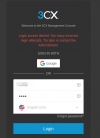
1694575521402.png

I thought this was due to business hours, so I put my availability on the phone app as available, tried a private session, same result, cant sign into webclient.

When I try I get "too many attempts", even though I use those credentials (extension and pin) in the 3cx phone app, without a problem.

I disable all extensions (I had that problem earlier) and moved to a firewall-less network same result.

I am the ONLY user and extension in the 3cx environment AND I am the admin.

Any advice here?

Thanks.
 
I also tried resending credentials, but they never arrive.
 
This means that your public ip is blacklisted after 3 failed attempts. If you try from another public ip, you still get blacklisted?
 
I just tried again from a different public IP. First attempt, same thing.
 
3CX SMB or 3CX Free has no management console. You have to use the url @TheodorosG_3CX posted.
 
  • Like
Reactions: TheodorosG_3CX
I have the same problem today. I could login yesterday without any problem, now my IP got blacklisted. I can't even reset my passwords because it says i made to many attempts. So i cannot login to webclient or to management console.
Any other People have the same problems?
 
This post is related with an SMB installation. Are you on an on-premise installation?
 
We have a self hosted pro version. But the problem is the same. Should i open a new thread or is there already a solution for that?
 
For the self-hosted you may also access it using a different public ip, for example try to access the management console from your mobile device with a 4G connection.
 
i tried it from another remote and it said, that the pw was wrong. I now could manage to reset the password for the admin account. I think i can handle it from now. Thanks!
 
  • Like
Reactions: TheodorosG_3CX
Good to know.
 
It's been a few days and I stll have the same problem. I am ONLY able to connect via the smart phone (which is using WiFi/Same Public IP, even though a different IP didn't make a difference).

I am using free cloud and I don't feel I should pay for support for something I didn't have any control of.

Thanks.
 
I found a bug in the Webclient portal.

When I originally signed up for 3CX Cloud Hosted free, I used our company google business hosted account, via SIGN IN WITH GOOGLE. We have since have gotten rid of all google accounts, but 3CX for some reason still had to use the "sign in with google" even though there is no good account or email address associated with google anymore. (meaning I can't sign into google at all with our old business account, because it's not there and the domain is hosted elsewhere)

Apparently there is a 3CX internal database or something that has it registered so even though the "sign in with google" option doesn't have any back-end account on google anymore, it does on the 3CX IAM/Authentciation database.
 
As stated in previous reply in this post, the SMB installations do not provide a management console as the URL should be something like https://1xxx.3cx.cloud/webclient/#/login
Are you referring to an SMB or a self-hosted installation here?
 
Hello and sorry for the delayed response,

I was referring to a SMB installation. I was unable to sign into it because of the bug mentioned above.

Basically if a user creates the SMB/Cloud Hosted account on a google account, then deletes the google account completely, you still have to "sign in with Google" even though no account officially exists there. If I went to sign into google outside of 3cx, it would say the account isn't valid.
 
Hello and sorry for the delayed response,

I was referring to a SMB installation. I was unable to sign into it because of the bug mentioned above.

Basically if a user creates the SMB/Cloud Hosted account on a google account, then deletes the google account completely, you still have to "sign in with Google" even though no account officially exists there. If I went to sign into google outside of 3cx, it would say the account isn't valid.
Thats your fault, how should 3cx know that you deleted your mail adress?
 
Status
Not open for further replies.

Forum statistics

Threads
112,018
Messages
590,315
Members
164,962
Latest member
robroye