Webcam not detected in Chrome for Webmeeting

Status
Not open for further replies.

JCubio

Free User
Joined
Oct 7, 2019
Messages
134
Reaction score
13
Hi Experts,

I tried reading this post, but I can't get it.
Has anyone still have an issue on the camera in the WebMeeting? How do address this?

TIA
 
Hi @JCubio

What error do you get exactly?
 
Hi Sir @JohnS_3CX ,
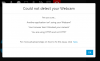
This is what I see.
View attachment 13216
Do you have a webcam plugged in and working on your PC first?

Then, check the upper-left beside the address bar, there's the lock icon, click on it. You will have the permissions for the website, you have to allow the webcam access.
 
Hi Sir @JohnS_3CX ,

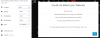
Yes the camera is working and all permission is good
13217

And the thing is, WebMeeting is working in firefox.
 
Hi All,

I got it working. The problem is our OS version (Windows 10 Pro N Workstations) doesn't have the Windows Media Feature installed.
After installation it works now.

Thanks for your time replying to this query.
 
  • Like
Reactions: Evolute IT
Hi All,

I got it working. The problem is our OS version (Windows 10 Pro N Workstations) doesn't have the Windows Media Feature installed.
After installation it works now.

Thanks for your time replying to this query.

Correct, I also noticed this limitation in Chrome when using Windows 10N, no website could access my cam at all. It may be a recent change to Chrome or a recent Windows patch (haven't confirmed it).

We may add a check in the Web Meeting for this in case the camera initialization fails
 
Status
Not open for further replies.

Forum statistics

Threads
111,973
Messages
590,076
Members
164,895
Latest member
jasonkkrause