Webclient stop to open weblinks - Again

Status
Not open for further replies.

Joaopauloaos

Customer
Joined
Aug 31, 2020
Messages
30
Reaction score
5
Hi,

https://www.3cx.com/community/threa...ient-stop-to-open-weblinks.75773/#post-343755

I had made this post some time ago, and, in that time, after an update on 3CX, its start working, and work for almost an year.

2 or 3 week ago, its start to have a random behavior. With the same issue again. Some times works, some times not.

The webclient are not opening the CRM URL.

But now, some time its open, sometime its not, we cant determine exacly what is happen.

Looking at the CRM Integration on the 3CX, I cant found any error. Everythink looks good, however, the fact is that are not working.

To make it work again, I have to reboot the machine (server). Some times its works for several hours, some time its works just for few minutes, and start this behavior.


=========================

CRM Lookup ->
Started scenario with empty id
Request text: https://api.izleads.com.br/api/voip/get_contact.aspx?key=XXXXX&pbx=XXXX&phone=7770195513997016577
Response text: {"ID":"4971671","firstname":"HERMILO","lastname":"LOPES","company":"","email":"","phone1":"7770195513997016577","phone2":null,"phone3":null,"phone4":null,"url_info":"https://www.izleads.com.br/account/Parceiros/Atendimento.aspx?IdPessoa=4971671","CodigoResultado":"00","Mensagem":"Valores retornados com sucesso."}
Response finished
Variable ContactID set to 4971671
Variable FirstName set to HERMILO
Variable LastName set to LOPES
Variable CompanyName set to
Variable Email set to
Variable PhoneBusiness set to 7770195513997016577
Variable PhoneBusiness2 set to
Variable PhoneMobile set to
Variable PhoneMobile2 set to
Variable ContactUrl set to https://www.izleads.com.br/account/Parceiros/Atendimento.aspx?IdPessoa=4971671
Finished scenario with empty id
Result obtained
 

Attachments

  • Captura de tela de 2021-10-15 10-14-48.png
    Captura de tela de 2021-10-15 10-14-48.png
    237.3 KB · Views: 6
  • Captura de tela de 2021-10-15 10-15-08.png
    Captura de tela de 2021-10-15 10-15-08.png
    237.7 KB · Views: 5
  • Captura de tela de 2021-10-15 10-16-04.png
    Captura de tela de 2021-10-15 10-16-04.png
    236 KB · Views: 7
  • Conseguiu falar mas nao carregou o contato.png
    Conseguiu falar mas nao carregou o contato.png
    94.5 KB · Views: 9
  • Screenshot(8).png
    Screenshot(8).png
    20.5 KB · Views: 8
Hello @Joaopauloaos,

I'm moving the thread to the CRM forum, as the issue seems to be related to the integration.

First, I can see that you're using a custom template, and also you're running 3CX v18. Please note that templates in v18 need a small adjustment regarding what you had in v16:
1) In the contact lookup and contact creation scenarios, you need to return the EntityId and EntityType outputs, which will be stored in 3CX Contacts, and passed on to the ReportCall / ReportChat scenarios. This way we avoid the contact lookup during call/chat journaling.
2) In the ReportCall / ReportChat scenarios you don't have the variables starting with [Contact::XXXXXX] anymore. If you need the contact id, you should use the variable [EntityId]. If you need the contact type, you should use the variable [EntityType].

More details on this here:
https://www.3cx.com/docs/server-side-crm-template-xml-description

In any case, showing or not the contact popup is not related to that. But please check it in case you need the integration working properly.

Regarding the popup issue, I can see that the caller's name is not shown, so no contact is being matched in this case. We would need to understand why the contact is not being matched, or attached to the call. To do this, I will need that you enable verbose logs, and then reproduce the issue and send me the Support Information Package in a private message (please do not attach it here, as it contains sensitive information).

Thank you.
 
  • Like
Reactions: Evolute IT
Hi,

I have the file, but I am not founding how to send a Private Message to you.

Hello @Joaopauloaos,

I'm moving the thread to the CRM forum, as the issue seems to be related to the integration.

First, I can see that you're using a custom template, and also you're running 3CX v18. Please note that templates in v18 need a small adjustment regarding what you had in v16:
1) In the contact lookup and contact creation scenarios, you need to return the EntityId and EntityType outputs, which will be stored in 3CX Contacts, and passed on to the ReportCall / ReportChat scenarios. This way we avoid the contact lookup during call/chat journaling.
2) In the ReportCall / ReportChat scenarios you don't have the variables starting with [Contact::XXXXXX] anymore. If you need the contact id, you should use the variable [EntityId]. If you need the contact type, you should use the variable [EntityType].

More details on this here:
https://www.3cx.com/docs/server-side-crm-template-xml-description

In any case, showing or not the contact popup is not related to that. But please check it in case you need the integration working properly.

Regarding the popup issue, I can see that the caller's name is not shown, so no contact is being matched in this case. We would need to understand why the contact is not being matched, or attached to the call. To do this, I will need that you enable verbose logs, and then reproduce the issue and send me the Support Information Package in a private message (please do not attach it here, as it contains sensitive information).

Thank you.
 
I put the file on google drive and sent the link to you over conversation
 
  • Like
Reactions: edossantos
I made an reboot on the virtual machine.

The software start to work imediatly.
After 10 minutes, stops to work again.
 
Thanks, I will check this and come back to you as soon as I can.
 
Hi, I just let you know, that I made some tests yesterday, with an empty callcenter, and, all configurations works fine.
I had test each route, and each "make call", and in all cases, the system works fine.

This situation make me think what is diferent in a bussiness time? And, what is diferent is the volume and concurrency threads.

I had a configurantion in make call, like this:

// 100 * (60/15) = 400 calls per minute
int parallelDialers = 100;
int pauseBetweenDialerExecution = 15;

and I change to:

// 20 * (60/3) = 400 calls per minute
int parallelDialers = 20;
int pauseBetweenDialerExecution = 3;

My theory, is that this is a concurrency problem in some place, and this will make this problem occur less frequently.

And today, in the first 30 minutes of work, the operators said that this happen less times.
Bingo!

So, with this information, I hope that you can found the bug.

Regards,
 
Hello @Joaopauloaos,

Thanks for your patience with this. I've been investigating the issue and I think I have some clues....

First, please note that when you configure the dialer like that, it will make many less calls, and that's what makes the issue less frequent, and not the number of concurrent dialers. The logic that you're applying to determine the number of calls per minute that will be triggered is not quite accurate, because you're missing the time that it takes to make the call. The Make Call component in the dialer will take some seconds to execute, because it waits for the call to get established. Then, for example, it could wait in average 10 seconds, and then the pauseBetweenDialerExecution that you're setting as 3 seconds will become 13 seconds.... That, combined with the reduced number of parallelDialers will cause that you have many less calls.

Said this, let me explain what I have found so far. I'm seeing the following lines in the 3cxSystemService.log file:
2021/10/18 12:42:08.632|17405|0005|Trac|Discarded number processing due to queue capacity or service stop

This happens when there are too many pending CRM lookups to process. The queue capacity is set to 256 items, so this means that there are 256 calls waiting for the CRM lookup without a result.

Also, CRM lookups are processed concurrently, using the number of concurrent jobs that you define in your template. In the log I can see that you have this set to 2:
2021/10/18 12:42:56.346|17405|0029|Info|CRM: maxConcurrency=2

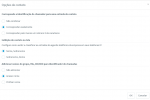
This is what you define in your template here:
1634647242986.png

Setting a larger value there will probably help solving the issue, because with this setting 3CX will process 2 calls at a time. And for each call, there is a delay, because the CRM takes time to provide an answer. For example, this is the log for 3 different calls, where we can see when the lookup starts and ends:
2021/10/18 12:42:56.346|17405|0029|Info|CRM: making request to CRM. Number=7770195511941736131
2021/10/18 12:42:57.167|17405|0029|Info|CRM: New lookup data '818405' will be attached to all connections related to number 7770195511941736131

2021/10/18 12:44:08.640|17405|0035|Info|CRM: making request to CRM. Number=7770195516992020875
2021/10/18 12:44:09.612|17405|0024|Info|CRM: New lookup data '818461' will be attached to all connections related to number 7770195516992020875

2021/10/18 12:44:09.614|17405|0024|Info|CRM: making request to CRM. Number=7770195511966474877
2021/10/18 12:44:10.937|17405|0024|Info|CRM: New lookup data '818463' will be attached to all connections related to number 7770195511966474877

You will see that in average it takes 1 second to get a response from the CRM, which should be fine if the traffic is low. But having 400 calls per minute, and only 2 concurrent CRM lookups, will cause that you can process 120 calls per minute. More than that will start queueing CRM lookup requests, and after some minutes we will see the logs indicating that CRM lookups are being discarded. When the CRM lookup is discarded, your agents will not get the popup. Also, when the queue starts filling up, your agents might experience a longer delay to get the popup, and at some point no popup at all, because the CRM lookup will be executed 2 minutes after the call has started, and the call might not be established anymore by then.

So, I think that the solution is in your hands, by editing the custom template you created. Maybe increasing the number of MaxConcurrentRequests to 32 will help you dealing with more calls in less time.

A final comment: I can see that the template is returning the EntityId and EntityType only for the contact lookup scenario. The contact creation scenario is there, but doesn't provide this. You should also add those outputs in the contact creation scenario. I can see in your logs that you don't have calls to unknown contacts, so this is not affecting you, but just to be on the safe side, you should have it.

Regards.
 
Fantastic! Thanks a lot! Makes all sense!
I implement this now, and I think that is working.

I never had pay attention to that variable.

Thanks again!
 
Hi,

The error move on to another point.

I had test that MaxConcurrentRequests with 32, 64, and 128.

In all cases, its start working good, and then stops.

Some of they work, some not.

I had make a stress test over my http server, that was the result:

Average ~39.495 ms on average

I had run this test with 800 concurrent connections, and the average stay in 120ms.

Well, this mean that I dont have an delay problem on http server.

Lets see a Log from one call:

root@elastix:/var/lib/3cxpbx/Instance1/Data/Logs# cat *.log | grep -a "7770195511947212233" | sort

The call start at:
2021/10/19 17:19:43.032|3998|0007|Verb|Add to processing. Number=7770195511947212233, connection=1065, state=Ringing

ten secconds later:
2021/10/19 17:19:53.943|4074|0007|Info|New incoming call to Q:805 from 7770195511947212233; qcid=1121

almost 1 minute..
2021/10/19 17:20:35.467|3998|0048|Info|CRM: making request to CRM. Number=7770195511947212233
2021/10/19 17:20:35.468|3998|0048|Verb|Performing GET request 'http://api.izleads.com.br/api/voip/get_contact.aspx?key=XXXXXXXXXXXXXX'.

More 1 minute...
2021/10/19 17:21:44.983|3998|0028|Verb| 'PhoneBusiness' = '7770195511947212233'
2021/10/19 17:21:44.983|3998|0028|Verb|The response is: '{"ID":"10894998","EntityType":"contact","firstname":"JOAO","lastname":"PEREIRA","company":"","email":"[email protected]","phone1":"7770195511947212233","phone2":null,"phone3":null,"phone4":null,"url_info":"https://www.izleads.com.br/account/Parceiros/Atendimento.aspx?IdPessoa=10894998","CodigoResultado":"00","Mensagem":"Valores retornados com sucesso."}'
2021/10/19 17:22:17.016|3998|0028|Info|CRM: New lookup data '847976' will be attached to all connections related to number 7770195511947212233
2021/10/19 17:22:17.017|3998|0028|Info|CRM: processing of 7770195511947212233 has been finished
2021/10/19 17:22:17.017|3998|0028|Verb|Removed from processing. Number=7770195511947212233


and, in any time, if I made a "curl" on that URL, it will answer imediatly.
 

Attachments

Complemeting, another case.

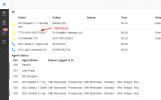
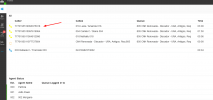
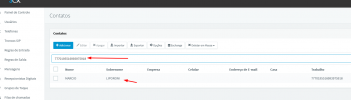
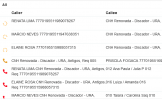
The contact are on "contacts", but are not in call tab:

19/10/2021 18:12:54.409 [0000214c] IVR session has been started for call from 7770195516993975918
2021/10/19 18:12:31.172|8593|0006|Verb|Not processed. Number=7770195516993975918, connection=12515, state=Ringing
2021/10/19 18:12:31.172|8593|0006|Verb|Add to processing. Number=7770195516993975918, connection=12515, state=Ringing
2021/10/19 18:12:31.172|8593|0006|Verb|CRM: LocalMatches=. Number=7770195516993975918, connection=12515, state=Ringing
2021/10/19 18:13:36.211|8593|0074|Info|CRM: making request to CRM. Number=7770195516993975918
2021/10/19 18:13:36.211|8593|0074|Verb|Performing GET request 'http://api.izleads.com.br/api/voip/get_contact.aspx?key=XXXXX'.
2021/10/19 18:13:37.751|8593|0053|Verb|The response is: '{"ID":"10975627","EntityType":"contact","firstname":"MARCIO","lastname":"LIPORONI","company":"","email":"","phone1":"7770195516993975918","phone2":null,"phone3":null,"phone4":null,"url_info":"https://www.izleads.com.br/account/Parceiros/Atendimento.aspx?IdPessoa=10975627","CodigoResultado":"00","Mensagem":"Valores retornados com sucesso."}'
2021/10/19 18:13:37.751|8593|0053|Verb| 'PhoneBusiness' = '7770195516993975918'
2021/10/19 18:14:25.991|8593|0053|Info|CRM: New lookup data '657787' will be attached to all connections related to number 7770195516993975918
2021/10/19 18:14:25.993|8593|0053|Verb|Removed from processing. Number=7770195516993975918

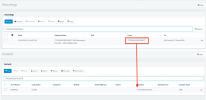
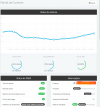
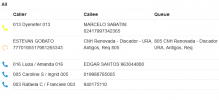
The picture from "Call Panel" was taken 3 minutes later, and the name was not displayed.
 

Attachments

That is the magical number on dialer.

1634679544784.png

If I put > 50, like 60, 70, 80, 90, 100, stops working.

With 50, everything is ok
1634679610850.png

With 50 paralleDialers, Callers name are displayed fine, and "browser pop up" ok too.
 
One more update, I upgrade the vm, from 16 cores, to 24 cores, and to a faster server, and now, the limit is 100.

1634744029867.png

1634744048477.png

Looking at my logs, last week, I had this same configuration, 100/15, with the same VM, on the slowest server, and was fine.

What change from last week to this week, was that I had applied the new 3cx version.
 
Forget about the above post, after a while, stops working with 100/15.

1634746215893.png
 
This seems to be a load issue. You are starting too many calls, and the system can't get the contact details as fast as it needs, then the lookup requests start queueing, and at some point some lookups are discarded. I would need to analyze the logs again from a test run after you edited the template. Can you generate another Support Information Package for me?
 
Yes, I will generate now.
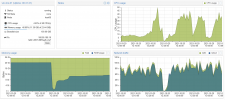
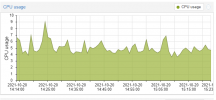
But, what is interesting, is that, with 70 parallel dialers, works fine, and only 7% of CPU
1634754227939.png

When I put 80 parallel dialers, CPU goes to 50%, and stops working. This dont scale very well
 
Are you using the Result property Make Call component? If you don't use it, please configure the Timeout property in the Make Call component to 1 second. That will release the dialer much faster, and you will need less parallel dialers to do the same job.
 
No, I dont use it for anything. I did the chage now. I let you know if its works in couple of hours.
 
  • Like
Reactions: edossantos
I did it.
numbers called go high, systems stops to resolve names...
I had to decrease the number of parallel dialers, and after some trys, the new magical number is 30 paralleldialers.
 
In the last Support Information Package you sent me, I don't see the following log anymore:
Discarded number processing due to queue capacity or service stop

That means that 3CX is processing the contact lookup requests on time, not discarding any request.

Also, I checked a few requests, and the timing looks fine, I couldn't find any lookup being resolved with a long delay since the call starts.

Please keep it running with this new configuration and when the issue happens again, send me an updated Support Information package and let me know a destination number for which you didn't get the popup, so I can check what happened for that specific call.
 
Status
Not open for further replies.

Forum statistics

Threads
111,989
Messages
590,159
Members
164,924
Latest member
Jordius