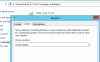
The language of the "welcome email " depends on the culture and system locale . If you installed on a Spanish locale, the welcome email will be in Spanish. To set it to English, you need to change the system locale to English and restart the machine.
The locale already seemed to be set to United States. I rebooted the system just to make sure and it still sends the welcome email in Spanish. Is there also a setting in 3CX? I noticed all the other email messages in the email server settings area are in English, the Extension Welcome email is the only one in Spanish. Maybe it's the only one that changes though.
1. Go to administrative tab.
2. click on "change system locale", select your locale and click "Ok"
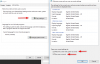
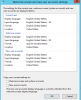
3. click on "copy settings" and enable the two options highlighted in the attachment below.
4. restart the system.
@Vanni, I would assume you'd do similar to what I did when I changed the language to English per roland's recommendation. I guess that would be for every extension.
@kraichle, our machines are on Debian that is bit different from Microsoft OS. I suppose should be an option within 3CX to switch the language for the welcome email.