Welcome Email without Re-Provisioning Phone

Brian Buell

Silver Partner
Basic Certified
Joined
Aug 9, 2017
Messages
67
Reaction score
52
I understand the security requirements of v20 and Users resetting their password for Web Client Access.
I do not understand why that same process has to affect their desk phone.
One has nothing to do with the other and adds a significant amount of work for an unrelated function.

We need a way to:
  • Send 3CX Welcome Email to allow Users to JUST reset their Web Client Password
  • Separately, Reset Just Phone Credentials, requiring device re-provisioning.

Please, Please Please...
 
  • Like
Reactions: PhoneMan123
The user can login by himself and reset the password. You dont need to send any welcome mail.
Yes I am aware, but they need to know the URL. So it's necessary to communicate that somehow.
 
Yes I am aware, but they need to know the URL. So it's necessary to communicate that somehow.
Send them an email sorry, but I don't see any problem there.
 
  • Like
Reactions: Greg_G and N_G
  • Like
Reactions: N_G
What is becoming abundantly clear is, "Don't use the Reset Password Button".
There is no reason anymore to send a Welcome Email.
Simply provide the user with the FQDN and let them do it themselves.
The Welcome Email was just a nice and somewhat automated way to provide user access information without having to reset every credential for that users, including their desk phone.
 
Resetting does change the desk phone password. As I recall, in previous v20 updates that disconnected the phone but I can't find a thread, in a quick search here. However I just did it on update 3 and it does push the new password to the phone. I think a Reset still disconnects the various apps though.

And yes obviously one can manually send an email. A button would be nice, especially if sending a lot of them at once.
 
  • Like
Reactions: Brian Buell
Not sure on the reset of desk phone AuthID password, that would be bad,
It IS possible to select multiple Users, some/all or a selection, then issue a reset of their passwords (Reset Button end of toolbar).

I just used this on a new client, after creating the Extensions WITHOUT email addresses...
and once I had a full list, confirmed by the client, I added the email addresses,
selected all users, and issued a reset.
They all got the email.

I miss sending the QR code, but understand the security rational.
 
Not sure on the reset of desk phone AuthID password, that would be bad,
It IS possible to select multiple Users, some/all or a selection, then issue a reset of their passwords (Reset Button end of toolbar).

Yes, that would be bad...and is bad and is in fact the case and reason for this this post.
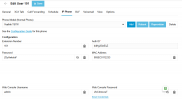
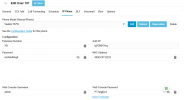
Please see Extension Credentials before and after "Reset Password"

Before
1733953388485.png

After
1733953420219.png
 
  • Like
Reactions: Greg_G and bitn2
Why are we touching the phone at all?
We had a system that would let us ONLY ReGen what was needed.
 
Last edited:
Sounds like a difference in philosophy... or focus.
If "Reset" means change all security creds/keys because we're concerned that the user/device may have been compromised,
then ressetting everything makes sense.
If "Reset" means changing the user password (and likely the QR code) then changing the device is not necessary.

Maybe we need two different Reset procedures? Buttons?
 
Sounds like a difference in philosophy... or focus.
If "Reset" means change all security creds/keys because we're concerned that the user/device may have been compromised,
then ressetting everything makes sense.
If "Reset" means changing the user password (and likely the QR code) then changing the device is not necessary.

Maybe we need two different Reset procedures? Buttons?
Works for me!
 
There are different buttons.. Reset and reset password.
 
Sounds like a difference in philosophy... or focus.
If "Reset" means change all security creds/keys because we're concerned that the user/device may have been compromised,
then ressetting everything makes sense.
If "Reset" means changing the user password (and likely the QR code) then changing the device is not necessary.

Maybe we need two different Reset procedures? Buttons?
Just have the user reset their own password at the login screen.

As an admin, I'd jump at the chance to not have to deal with these types of issues every Monday morning, or when someone returns from Annual Leave and forgets their password.

In previous versions, yes you would need to manually intervene, but no longer the case.
 
You are missing the point...
This has nothing to do with User Access to the Web Client - which is wonderful.
WE Love the "Forgot Password" link.
I am simply asking to separate User from Device

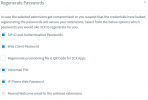
We have always had options...

1734105518749.png
 
We and our clients love all of the information that gets sent in the welcome email. Links and VM PIN and login instructions. I've tried to recreate that with the Forgot Password email but it seems those elements are not allowed and come across blank. I usually have the users built well ahead of them getting new phones. We don't like to send the welcome emails too early as the link expires in them.

It's been hit or miss on the phones disconnecting when using the Reset link but we have had several that did not pull the config again and had to be rebooted or defaulted
.
If we could modify the Forgot Password email to have more details it would be a better option.
 

Latest Posts

Forum statistics

Threads
111,962
Messages
589,978
Members
164,864
Latest member
SCarpenter@fifthavenue-la