- Joined
- Oct 16, 2019
- Messages
- 3
- Reaction score
- 1
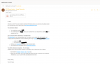
When I select an extension and send the welcome email it does not attach the config file for the windows client and does not add the QR code to the email and the pdf that it attaches when you try to open it it says this file cannot be previewed because it is corrupted.
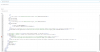
When I open the welcome email template it shows and error on line 75 named entity expected. Got none. This is the default template and I have not changed it. This seemed to happen after the last updated it also looks like it changes the template as it has removed the link to download the Windows client.
Any help will be greatly appreciated.
When I open the welcome email template it shows and error on line 75 named entity expected. Got none. This is the default template and I have not changed it. This seemed to happen after the last updated it also looks like it changes the template as it has removed the link to download the Windows client.
Any help will be greatly appreciated.