


- Joined
- Mar 6, 2020
- Messages
- 68
- Reaction score
- 18
Good Day,
As we cutover to v20 we hit an issue. We can no longer send out a Welcome Email without doing a password reset. This invalidates the config files and QR codes attached to the email (and any past emails) and is reducing our overall security. Let me explain.
We set strong passwords on the extensions when we create them. Something like: Y9RC6=wVJXfL$QxU5 On the old v18 system we could click "Send Welcome Email," the user gets a config file they can drag and drop onto their 3CX and they are up and running with a secure password. The QR code could be used for the mobile app. Worked great.
Now on v20, the user receives a Welcome Email with config and QR code attached, but neither of those files will be accepted because they contain a temporary password. User needs to change that password. As soon as they do, the config file and QR code (with the embedded temporary pw) don't work. We provision using the softphone provision button through the web interface just fine, but the larger concern is that the user can amend Y9RC6=wVJXfL$QxU5 to Password123* (One of our users literally did just that, it was picked up on an audit)
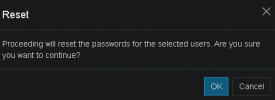
Can you please return the "Send Welcome Email" button to the interface? Place it adjacent to the Reset button so we can choose whether a user password needs to be reset? If a user needs to be set up again (or to add a second device) we can send the regular email without a reset and its a drag and drop affair. They would also have the email with config and QR for future reference.
Due to a merger we're onboarding another 400 users this year so this feature is sorely needed.
Here's a screenshot from a couple of our branch offices.
v18:

v20:

Thank you, have a nice weekend.
As we cutover to v20 we hit an issue. We can no longer send out a Welcome Email without doing a password reset. This invalidates the config files and QR codes attached to the email (and any past emails) and is reducing our overall security. Let me explain.
We set strong passwords on the extensions when we create them. Something like: Y9RC6=wVJXfL$QxU5 On the old v18 system we could click "Send Welcome Email," the user gets a config file they can drag and drop onto their 3CX and they are up and running with a secure password. The QR code could be used for the mobile app. Worked great.
Now on v20, the user receives a Welcome Email with config and QR code attached, but neither of those files will be accepted because they contain a temporary password. User needs to change that password. As soon as they do, the config file and QR code (with the embedded temporary pw) don't work. We provision using the softphone provision button through the web interface just fine, but the larger concern is that the user can amend Y9RC6=wVJXfL$QxU5 to Password123* (One of our users literally did just that, it was picked up on an audit)
Can you please return the "Send Welcome Email" button to the interface? Place it adjacent to the Reset button so we can choose whether a user password needs to be reset? If a user needs to be set up again (or to add a second device) we can send the regular email without a reset and its a drag and drop affair. They would also have the email with config and QR for future reference.
Due to a merger we're onboarding another 400 users this year so this feature is sorely needed.
Here's a screenshot from a couple of our branch offices.
v18:
v20:
Thank you, have a nice weekend.


