WhatsApp successfully deliver to a single user, but not group

Status
Not open for further replies.

paulsummers

Customer
Basic Certified
Joined
Feb 18, 2019
Messages
68
Reaction score
6
WhatsApp inbound and replies work fine when configured to a single 3CX user extension. Switch the WhatsApp 'SIP trunk' route to a group - or ring group and inbound messages do not arrive to any member of the group. The setup was completed as per the 3CX guide. Is anyone else seeing similar issues?
Enterprise license, version 18 update 6.
 
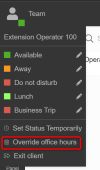
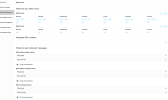
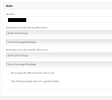
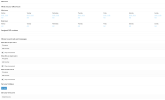
The messaging will follow the office hours destinations. Check where the destinations are currently, and whether office hours exist for the group, and finally check whether the system is in/out of office currently from here:

1675865505161.png
 
Office hours were not set for the group, do they need to be? Either way, I've done that now to set all days to 00:00-23:59. Messages still not being delivered to any group members.
I don't know where you are seeing the above 'Team' status with override office hours menu.
Where should the 'where to send calls and messages' be routed to? We have them set as a Ring Group.
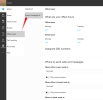
Screenshot 2023-02-08 at 14.54.22.png
 
- The screenshot is showing the top left of the webclient, where your avatar is. You can control the office hours of your group from there.

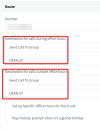
- Make sure that in the management console, there are no inbound rules for whatsapp, then edit the whatsapp trunk and send your calls to the Group
1675870677738.png

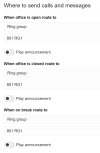
- Finally, now from the Webclient Admin, you can choose the destination of your group via Office Hours, and this destination will also serve as the Whatsapp destination.
1675870797187.png
 
  • Like
Reactions: N_G
Configured just as you've shown above but still nothing is being delivered when routing to a group.
 
Last edited:
So now in the MC it appears to route to a group like my screenshot correct?

If you edit the group Office hours (via WC now) where does the Group route its calls?
 
Run through again and everything seems to be configured correct. Screenshots of both mentioned screens:
Screenshot 2023-02-10 at 12.23.47.png

Screenshot 2023-02-10 at 12.25.04.png
 
Ok looking good, and does your tests user (the person expecting the message) belong under "828 Chat Test Ring Group" ?

Add that user alone. in the test chat, and use your personal smartphone Whatsapp (using a personal account, not business) to initiate a chat towards the DID you have assigned to Whatstapp integration.

Meanwhile, ensure that if there is a current whatsapp chat (ie. if you sent a conversation to an individual user earlier) that you mark it as dealt with. This is to make sure that when a new one comes in, it will go where you want it to go.
 
828 Chat Test Ring Group - I am the only group member.
The previous chats that routed to my individual user account are marked 'dealt with'.
Nothing received.
Added a different user as the sole group member and they don't receive anything either.
 
I have same problem. I am using 18.0 Update 6 (Build 908)Version (Free Hosted 3cx)

Additionally, only the messages are delivered to the extension that was configured when the trunk was created. If I put another extension I don't receive messages.
 
  • Like
Reactions: paulsummers
I have done many tests and it is working in the 3CX that I have managed by myself, but in the hosted one it does not work. Does anyone have any idea what is going on?
 
I've continued to test this, and it does feel like there is a bug here when routing WhatsApp messages to a group. I'm a bit concerned as we promised this functionality to a client for a live event project that is happening next week!
 
@paulsummers just to confirm, when you were editing the office hours and destination, was the correct group selected (like the screenshot below)?

If it was correct, then the best I can suggest to you is to tear down the integration and do it again from scratch following the guide, but with extra scrutiny just in case anything was missed: https://www.3cx.com/docs/manual/whatsapp/

In my testing I was able to route the messages exactly as you would have wanted so we can confirm its possible for your customer.

1676288828769.png


EDIT: Check the rest of your trunks on the system - make sure the same number is not used there. You should not have duplicates whether in international format, regular format, or wildcard format
 
Yes, all identical. Already have redone, same issue.
 
Hi Paul,

I think we covered all the basics at least, so at this point the best I can suggest is to contact 3CX Support directly and get help to troubleshoot your setup.
 
Hello guys. Did you solve this problem?
 
Ok understood. In this case the best I can suggest is to contact a 3CX Partner so they can help you troubleshoot.

Someone will need to log into the system and check the entire setup and call flow.
 
Status
Not open for further replies.

Members Online Now

No members online now.

Forum statistics

Threads
111,831
Messages
589,277
Members
164,660
Latest member
RJenkinsROCK