When tapping on a phone number on a website or email, 3CX app is no longer an option to use

cpe90

Customer
Joined
Mar 7, 2023
Messages
78
Reaction score
19
I have tried it on IOS 15.7.1 and 18.3.1, and the results are the same.
The only option I have is to dial from the native cell number.
We have never had the issue before; we just found out about it today after doing an audit. Based on the feedback we are getting, it started sometime in 2024.

The 3CX app version is 20.0.9 on both devices.

I tested it on my Samsung Galaxy S21; I have no issues.
See the screenshot below.
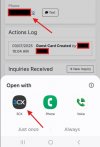
Screenshot 2025-03-07 121002.jpg

Could you guys fix the app, please?
We are tracking in/out calls on 3CX, so our outbound numbers are way off because the sales team stopped using the 3CX app.

We greatly appreciate it.

Thank you.
 
@cpe90
The screenshot above is highly from an Android device, please provide one from an iOS device.

Note: on iOS you have to long press the number on native apps:

for eMail
- send an email to yourself, as body 1234567890
- open on your iOS with native Mail app
- long press the 1234567890 until appear a menu
- check if 3CX appear in Call and Video menus alongside Phone and FaceTime
- tap 3CX and see if our client launches and automatically dial 1234567890

for website:
- open this forum message on your iOS device native Safari browser and there long press the highlighted 1234567890 and check as above.
 
Last edited:
@cpe90 If it helps it is on a submenu…you should see:

Call
Video
Message
>Call
>Video

…and it’s under >Call.

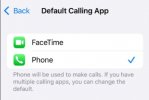
iOS does have a setting for Default Apps (for Calling) but mine only lists Phone and FaceTime.
 
  • Like
Reactions: Evolute IT
@cpe90 If it helps it is on a submenu…you should see:

Call
Video
Message
>Call
>Video

…and it’s under >Call.

iOS does have a setting for Default Apps (for Calling) but mine only lists Phone and FaceTime.

I'm sorry, I'm not following what you meant with the submenu.
I'm using iOS 18.3.1, and they moved things around.
I did search for "Call" in Settings, and the result is all over the place.
Would you mind sharing a screenshot to find this submenu?

But under Default Calling App, this is what I see.

Screenshot 2025-03-10 104811.jpg
 
@cpe90
The screenshot above is highly from an Android device, please provide one from an iOS device.

Note: on iOS you have to long press the number on native apps:

for eMail
- send an email to yourself, as body 1234567890
- open on your iOS with native Mail app
- long press the 1234567890 until appear a menu
- check if 3CX appear in Call and Video menus alongside Phone and FaceTime
- tap 3CX and see if our client launches and automatically dial 1234567890

for website:
- open this forum message on your iOS device native Safari browser and there long press the highlighted 1234567890 and check as above.

Here you go.

Screenshot 2025-03-10 105851.jpg

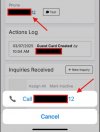
And this is the screenshot from the iOS version you requested when we hit the phone number on the same page of our guest card.
FYI, this is a web application.


Screenshot 2025-03-10 105519.jpg


Thank you guys for helping.
 
  • Like
Reactions: Vali_3CX
@cpe90
Can you check also on an iOS17/16? I'm thinking to don't be a problem of priority, which WhatsApp/3CX was the most recent installed, specific to iOS18 and to which I'm not familiar with.
 
@cpe90
Can you check also on an iOS17/16? I'm thinking to don't be a problem of priority, which WhatsApp/3CX was the most recent installed, specific to iOS18 and to which I'm not familiar with.

It works on iOS 15.
I can see 3CX in the sub-menu.
It's possible that the code needs to be updated for iOS 18?
 
Last edited by a moderator:
  • Like
Reactions: Vali_3CX
There's no code for this, is due to CallKit integration, iOS performs everything.
We'll check to see with multiple third-party apps on iOS18 (I can see 3CX on my iOS18, but I have no SIP/WhatsApp on it, so test is not concludent)
 
Last edited:
Well, guess what?
Since you mentioned "which WhatsApp/3CX was the most recent installed", I removed and reinstalled the 3CX app as a workaround, which FIXED it!
All I know is I shouldn't have to do that, though, because I can honestly see how many dark stares I will get once I send the email about this. Lol.

So now I'm unsure if this is an iOS or 3CX app issue.
However, the screenshot of iOS 18 below shows that it is working now.
Thank you for your prompt responses.

ios18.jpg
 
  • Like
Reactions: Vali_3CX
Well, I guess I spoke too soon. Got too excited.
I tried it from the Outlook app by tapping on a phone number in the email signature, and 3CX is not showing up (screenshot below), so I guess it only works from an "Internet Browser" app. I guess? :(


ios18-outlook.jpg
 
That's
Well, I guess I spoke too soon. Got too excited.
I tried it from the Outlook app by tapping on a phone number in the email signature, and 3CX is not showing up (screenshot below), so I guess it only works from an "Internet Browser" app. I guess? :(
As you can see, neither WhatsApp is shown - we figured out when we implemented and tested (iOS13 or 14 I guess) that iOS does provide 3rd party tel apps (WhatsApp, 3CX) in the menu ONLY for native, Apple, apps, like Mail, Safari, Notes as I specified earlier. We assume is for security/privacy purposes since they kept this behavior up to iOS18.
 
That's

As you can see, neither WhatsApp is shown - we figured out when we implemented and tested (iOS13 or 14 I guess) that iOS does provide 3rd party tel apps (WhatsApp, 3CX) in the menu ONLY for native, Apple, apps, like Mail, Safari, Notes as I specified earlier. We assume is for security/privacy purposes since they kept this behavior up to iOS18.

Yes, I'd agree with you here.
I thought Apple would trust you once your app was approved in the App Store, sort of. I guess not. :(
 
  • Like
Reactions: Vali_3CX

Forum statistics

Threads
112,285
Messages
591,704
Members
165,406
Latest member
ARKC