where can I reformat incoming call information in V20?

greychain

Gold Partner
Advanced Certified
Joined
Jul 13, 2018
Messages
779
Reaction score
122
Previously in V18 I could use different parts of the sip message to ensure the incoming numbers were shown correctly. How do I do this in V20?

To: 012xxxxxx<sip:[email protected]:5060> I need to show the To; part instead of the sip part to the agent currently it shows the 085 as the incoming number
 
Do you not have "Reformat incoming our outgoing caller ID" under the "Options" tab of your trunk?
 
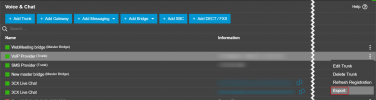
You would need to export the existing provider template

1733820928825.png

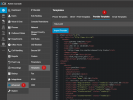
Do your modifications and then import your provider from the Templates page under the Advanced menu of 3CX.

1733821051550.png
 
Thanks, Will V20 go back to the drop down boxes in V18?
 
Not in the plans currently.

This types of question is difficult to answer as this is something that might change but we currently dont have more information.
 
Thanks, I'll give it a go.
 
  • Like
Reactions: NicholasP_3CX

Latest Posts

Forum statistics

Threads
111,962
Messages
589,978
Members
164,864
Latest member
SCarpenter@fifthavenue-la