Solved Why are some particular phones can't be reprovisioned (Yealink T27P)

Status
Not open for further replies.

Jay Leccio

Silver Partner
Advanced Certified
Joined
Feb 14, 2018
Messages
61
Reaction score
9
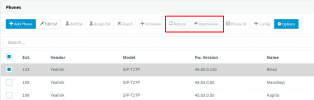
Hi, I need to reprovision phones after updating Provisioning from LAN to SBC. But i am unable to reprovision it as the Reprovision and Reboot is greyed out(disabled).
1714381271915.png

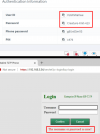
then, I tried logging in to phone's UI but I am unable to login using the phone's credentials(see screenshot). Is factory reset the only option for this?
1714381418654.png
 
The phone is provisioned as STUN?
 
It was originally set up as LAN, then updated to SBC
 
Does it say Unprovisioned? It can be the case where the template is wrong.
Also, use admin as login and password as a phone password there.
 
Yes. some are UNPROVISION. Some are not.
All good and thanks a lot. Admin as username worked!
 

Attachments

  • 1714386735763.png
    1714386735763.png
    40 KB · Views: 1
  • Like
Reactions: OlegR_3CX
ID and password is for the sip registration.

you want to log in with admin as the username and phone password for the password.
 
@Jay Leccio
So if you login, then the phone provisioned fine, and it can be the case that you pick a wrong template there
 
Yeah, after logging in, I need to manually edit the Provisioning URL and reboot. After rebooted, assign it back to extension. Thanks again for your help!
 
Thank you for the feedback. I will now close this thread.
 
Status
Not open for further replies.

Forum statistics

Threads
111,953
Messages
589,914
Members
164,849
Latest member
BillyAkansel
