Wich Extension causes blocked IP events

Status
Not open for further replies.

Lexima

Free User
Joined
Jul 14, 2020
Messages
3
Reaction score
0
In the event log I see a few Blocked IP-adresses because of too many failed authentications.
Is there any way to see wich extension/user has caused this event?
 
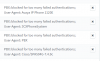
The reason is in the description for the blacklist

for example

1594715441809.png
 
I see the description - failed authentication - but which user is that? or which extension?
about half of the users are using an iPhone and almost everyone does use the Windows/MacOS app.

Also have the same entry that you posted - same IP - same Cisco only other time... - Any idea what that is.
1594718022238.png
 
These are attempts on your 3CX to hack into your system, 3CX has detected this and blocked the IP address - it is doing its job.

You can increase security by ticking 'Allow 3CX to collect any IP's that are blacklisted from this instance **' under Security Settings - Anti-Hacking

1594718449104.png
 
Our 3cx server has been crashed and rebuild so every user has received a new configuration file.
I'm very sure that one or more users didn't load the new configuration and that his/her phone or app tries to login with the old credentials. - thats why I want to know the username / extention.

The users have also an deskphone for use at the office so their need to load the configuration file is not priority for them..
 
Status
Not open for further replies.

Forum statistics

Threads
111,954
Messages
589,921
Members
164,851
Latest member
DrunkeMeister