Solved Windows Server 2019 Firewall Issues

Status
Not open for further replies.

Indiefilmguy

Free User
Joined
Dec 20, 2019
Messages
7
Reaction score
0
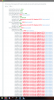
I'm running 3CX on a Windows Server 2019 machine and I think there are some weird issues going on with the port forwarding. All of the rules are defined in Windows Defender and the phones work from inside the building, but not from outside. As of today, they are no longer displaying the correct date and time as well. Screenshot from the firewall checker is attached.

Any advice?

Thanks!
 

Attachments

  • Screen Shot 2020-02-09 at 5.57.56 PM.png
    Screen Shot 2020-02-09 at 5.57.56 PM.png
    800.6 KB · Views: 20
Indiefilmguy,

I have many instances of 3CX running on Windows 10 and Windows Server 2019. All have the Windows Firewall and Windows Security (formerly called Defender) enabled. They all run without issue. Has anything changed with your router?

The 3CX installer creates all the necessary Windows Firewall entries and I have not seen an issue with it and my first Windows 10/3CX deployment in 2015.

Tell us more about your setup with these details: https://www.3cx.com/community/threads/information-to-provide-when-requesting-help.67558/
 
I am using the Windows Server 2019 as the router, fiber is connected directly to it. It is the latest version of 3CX.
 
So are you using windows routing and remote access?

Regards
 
Hi @Indiefilmguy

We recommend the 3CX system is installed on a dedicated machine that has nothing else installed at all.

Please relocate 3CX on another machine, and then open the firewall ports for its IP accordingly on your router.
https://www.3cx.com/docs/ports/

We recommend to use full cone NAT, the remapping that you see indicates that this is not the case at the moment and this needs to be addressed at the router.
 
What possessed you to set up your server as the router?

Are you also using Internet Connection Sharing from Control Panel? :p

You can get a WAN router for £20 and have that as your perimeter network.
 
  • Like
Reactions: diamond9
What possessed you to set up your server as the router?

Are you also using Internet Connection Sharing from Control Panel? :p

You can get a WAN router for £20 and have that as your perimeter network.
I am not using Internet Connection Sharing, lol. It is running Routing and Remote access.
 
So are you using windows routing and remote access?

Regards
Yes I am, and from another reply, it looks like I need Full Cone NAT. I'm sure I can research it this evening but do you know off the top of your head if R&RA is capable of it?
 
you do need full cone nat, and no i have no idea, never use a windows server as a router.
 
I am using the Windows Server 2019 as the router, fiber is connected directly to it. It is the latest version of 3CX.

This is wrong on so many levels, for so many reasons, namely 3CX needs its own box for proper, reliable, supportable functionality. Not to mention using windows as your router is like taunting hackers to come and attack you and breach that box. And if you think they won't discover its there, well that argument went flying out the window once 3CX generated an FQDN pointed right back at it with a whole bunch of open SIP Ports not to mention any ports windows itself has open as well. 3CX is extremely secure, but windows server is swiss cheese, and always has been.

Please tell me RDP, Remote Registry, are disabled, and NOT just changed to different ports like 33389, and god forbid that this is also a domain controller, if so you are literally in dire straights of being hacked....

And no, installing norton, cylance, or any other little AV will not solve the security problem, but will likely create new ones within 3CX.
 
Last edited:
Gee thanks everyone for your opinions on routers... Windows Routing and Remote Access with Symantec Enterprise and worked reliably for years. I switched to a router, reinstalled, restored from a backup, and now the phones won't register...
 
So I guess the first problem is it's unclear what your setup is. First you mention you think you have a problem with port forwarding but then you say it's plugged directly into your fiber and you are using it as a router. If the box has a public IP there is no port forwarding as 3CX resides on that box. It's also unclear from your statement that RRAS and Symantec Enterprise has been working from years if you mean 3CX was also working on there or if you just installed 3CX and it's never passed the firewall test. If using Windows 2019 as your router is what floats your boat, go ahead and continue to do so.

But for your new setup, it's unclear if you reinstalled/restored on the original 2019 box running RRAS or if this is a new machine VM. A network diagram would help.
 
So I guess the first problem is it's unclear what your setup is. First you mention you think you have a problem with port forwarding but then you say it's plugged directly into your fiber and you are using it as a router. If the box has a public IP there is no port forwarding as 3CX resides on that box. It's also unclear from your statement that RRAS and Symantec Enterprise has been working from years if you mean 3CX was also working on there or if you just installed 3CX and it's never passed the firewall test. If using Windows 2019 as your router is what floats your boat, go ahead and continue to do so.

RRAS and SE have worked for years and have been very secure on a server with a dual NIC. 3CX always worked fine and the firewall tests always passed, then one day it quit working and I starting getting the strange remapping going on in my screenshot above.

But for your new setup, it's unclear if you reinstalled/restored on the original 2019 box running RRAS or if this is a new machine VM. A network diagram would help.

I installed a new box after the issues with the original and it was time to upgrade anyway. I installed Server 2019 from scratch, installed 3CX, and restored the backup from the night before.The new machine with new install gave me the same issues.

I switched to a router now and reinstalled 3cx and restored the backup, but now none of the phones will register.

I unstalled 3CX and installed it on a Raspberry Pi to keep it on a seperate system (its only 10 extensions). I restored the backup yet again, try to login and get the login screen, IF it lets me login (and doesn't just ignore me pressing the "logon" button, then it gives the progress bar and the dashboard never loads.

I'm at the end of my rope with 3CX..
.
 
So before you started reinstalling everything was there actually an issue or do you regularly run firewall tests? For the Pi, I presume you assigned it a different IP address than what was on the 2019 box? And is this a Pi 3 or Pi 4?
 
Hi @Indiefilmguy

Is there any chance your ISP may be the cause? When 3CX Firewall Checks checks to see from which port it sends packets and which port it receives them, it can see if the port has changed but this doesn't tell us what caused the remapping.

Usually, its a router in front of 3CX, but some ISPs do carrier-grade NAT where the NATing occurs in their core network, before it even reaches you. I don't know which of the two is occurring in this case, but can you tell us for example what provider you use, and how everything is connected in a detailed manner?

Here is an example of what I mean by detailed:

1. Provider XYZ, Modem Model ABC, set in bridge mode/NAT mode/etc
2. LAN port 1 on provider modem connects to my Firewall Model ABC on WAN1
3. WAN1 on my firewall set with DHCP/Static etc
4. LAN1 on my firewall connects to 3CX machine NIC
5. Port forwarding internally between WAN1<->LAN1 for relevant ports (and list ports/protocols)
 
Thanks so much for all of the advice! After a long grueling night of putting the server behind a Cisco 1921, changing IP ranges (all all of the static IP’s (not a big network), everything is working perfectly. 3CX is back on the Domain Controller (the Raspberry PI was having issues and the license wouldn’t activate so I pushed it off for another day). Phones work, system is accessible from outside the the network, VPN is working again, and the date and time on the phones are all correct. The system worked for years as it was, both with Asterisk, and eventually 3CX until one day I started having firewall issues galore. Like I said, keeping 3CX on the server is a temporary arrangement but at least everything is working flawlessly again.
Thanks again everyone!
 
Status
Not open for further replies.

Forum statistics

Threads
111,935
Messages
589,823
Members
164,818
Latest member
Guriqbal Singh