Solved Windows V16 to V18? Cant find the file?

Status
Not open for further replies.

GrahamCracker

Customer
Joined
Feb 15, 2022
Messages
2
Reaction score
1
I'm following the instructions here:
https://www.3cx.com/docs/upgrading-pbx/

Specifically:
  1. Login to the Management console and go to "Backup and Restore".
  2. Take a full backup configuration (incl. Vmails and Recordings) for safety precautions.
  3. Uninstall 3CXPhoneSystem V16.
  4. Install 3CXPhoneSystem V18. Download the lastest version from your Customer portal account.
  5. Restore backup.
  6. Wait until the installation is complet
My download section only lists 3 files.
V16 PBX
V16 SBC
V18 SBC

I have an active maintenance plan on our license.


Am I not supposed to be able to download V18 of the PBX from here?

- Graham Slaughter
 
Hi @GrahamCracker,

When you log in to the Customer Portal, and click downloads, you should see this:

1644936252386.png

What do you see?
 
  • Like
Reactions: Evolute IT
I'm following the instructions here:
https://www.3cx.com/docs/upgrading-pbx/

Specifically:
  1. Login to the Management console and go to "Backup and Restore".
  2. Take a full backup configuration (incl. Vmails and Recordings) for safety precautions.
  3. Uninstall 3CXPhoneSystem V16.
  4. Install 3CXPhoneSystem V18. Download the lastest version from your Customer portal account.
  5. Restore backup.
  6. Wait until the installation is complet
My download section only lists 3 files.
V16 PBX
V16 SBC
V18 SBC

I have an active maintenance plan on our license.


Am I not supposed to be able to download V18 of the PBX from here?

- Graham Slaughter
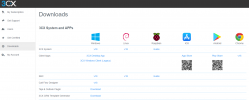
Just to help, you're using the old portal. You'll want the new one (blue button top right.)
 
  • Like
Reactions: VasilisV_3CX
Excellent! Glad to hear you managed! If you need anything else, feel free to open a new thread!
 
Status
Not open for further replies.

Forum statistics

Threads
111,974
Messages
590,081
Members
164,899
Latest member
mazet