


- Joined
- Oct 20, 2018
- Messages
- 1
- Reaction score
- 0
So after hours of searching I was not able to find any actual instructions on manually provisioning the Snom M9 system with 3cx v15 or any version really... But I have managed to get it working flawlessly... Music on hold, transfers, parking, caller ID from contacts in the system directory, ect... So here is how it's done for anyone else that wants to do it... Hope it helps!
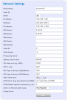
For stun, I used the FQDN of my PBX with the port 5060...
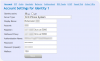 The account is your extension number. Registar and Proxy are the same as the STUN address. The authentication name and password are both listed in your extension settings page in the 3CX control portal.
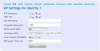 The conference URI is your conference code followed by ** and your extension in front of the same address as the STUN. For example, 700**[email protected]:5060.
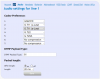
The rest of the info you can see in the images. Just make it match and you are good to go. I have a M9 base with 2 extensions on it and it works great with the Snom D375 and 3cx Android client all on the same network. The 3CX instance is hosted by Google so it's not on the premises and no issues so far.
For stun, I used the FQDN of my PBX with the port 5060...
The account is your extension number. Registar and Proxy are the same as the STUN address. The authentication name and password are both listed in your extension settings page in the 3CX control portal. The conference URI is your conference code followed by ** and your extension in front of the same address as the STUN. For example, 700**[email protected]:5060. The rest of the info you can see in the images. Just make it match and you are good to go. I have a M9 base with 2 extensions on it and it works great with the Snom D375 and 3cx Android client all on the same network. The 3CX instance is hosted by Google so it's not on the premises and no issues so far.


