XAPI - 403 Forbidden

Beats SRL

Silver Partner
Basic Certified
Joined
Dec 16, 2022
Messages
12
Reaction score
2
Hi everyone,


I’m having an issue with the XAPI. I enabled the service from the management panel, assigned it to the System Owner service, and copied the API key.


When I make a request to obtain the token, it works correctly, and the call to /xapi/v1/Defs returns 200 OK.


However, any other endpoint I try to call always returns 403 Forbidden.


Does anyone know what could be causing this or how to resolve it?


Thanks in advance for any help.
 
Hi,

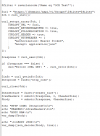
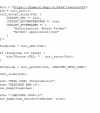
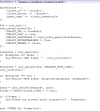
Can you give an example call with some verbose logs?
 
I have attached the script with all sensitive data removed, along with the output generated by the call.
 

Attachments

  • Immagine 2025-12-19 153119.png
    Immagine 2025-12-19 153119.png
    18 KB · Views: 4
  • Immagine 2025-12-19 153718.png
    Immagine 2025-12-19 153718.png
    28.3 KB · Views: 2
  • Immagine 2025-12-19 153659.png
    Immagine 2025-12-19 153659.png
    20.2 KB · Views: 2
  • Immagine 2025-12-19 153631.png
    Immagine 2025-12-19 153631.png
    32.1 KB · Views: 2
@Beats SRL

it's still working, simple Powershell example:
Code:
$tcxurl = "mypbx.mydomain.de"       # needs port if not 443

$jsonauthbody = (@{
    Username = "100"                # 3CX user, maybe email address
    Password = "Super_Secret0815"   # 3CX user password
    SecurityCode = ""
} | ConvertTo-Json)

$LoginResponse = Invoke-RestMethod -Uri "https://$tcxurl/webclient/api/Login/GetAccessToken" -Body $jsonauthbody -Method POST -ContentType "application/json"

if( $LoginResponse.Status -ne "AuthSuccess" ) {
    Write-Host "abort: authentication not successful"
    exit -1
}

$headers = @{Authorization = "Bearer $($LoginResponse.Token.access_token)"}

(Invoke-RestMethod -uri "https://$tcxurl/xapi/v1/Groups?`$filter=Name eq '3CX Test'" -headers $headers -Method GET -ContentType "application/json").value
 

Latest Posts

Forum statistics

Threads
111,953
Messages
589,915
Members
164,851
Latest member
DrunkeMeister