

- Joined
- Feb 24, 2016
- Messages
- 246
- Reaction score
- 36



Hi David,Hi Katerina,
Thanks for the info, it was useful to double check I'm doing ti the right way ;-)
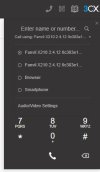
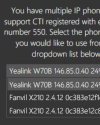
I've just moved a customer onto using the new web clients as opposed to the legacy desktop app and see that the DECT handset is not an option to be controlled by the app (it was/is on the legacy desktop app), is there a work around for this, or is this planned to be added etc.? Otherwise I'll have to get them all to go back to the old desktop app.
The image below shows what I mean, only 2 deskphones and browser and smartphone showing despite the extension also having a DECT handset. (the legacy desktop app shows them all including the DECT handset)
Regards,
David.
Web client
View attachment 35712
Legacy desktop app
View attachment 35713
Hi John,Hi David,
The legacy app was using a legacy protocol that made that possible regardless of what endpoints were used.
This method was never supported on the Web client or Desktop app and there are no plans to change this in the future.
If you want to keep using that feature, I'm afraid that the only way to do so will be via the legacy app.

Hi Robert,Hi all,
I have two Yealink W90DM (Dect Managers), one W90B (Base) and one W73H (Phone).
When configuring one Dect Manager, Base and Phone everything works fine, using provisioning as the manual writes.
I want to use the Yealink DM Backup option.
An additional DM is required (my second Dect Manager), and it is configured as a backup DM in the system. When the main DM is abnormal, the backup DM can immediately take over all the base and handsets in the system to ensure that the system can still work normally.
If I configure the second Dect Manager as DM-Reserve and register this on the primairy DM, It gives the Status Connected. Looks good so far.
FAILURE: But if I unplug the primairy DM, to test the failover, It does not come back online. The DECT light on the second DM and base are not green.
To be sure, I tested if the firmware (Lydis 130.87.188.1) and settings work without provisioning to 3CX.
And then within a few minutes, the Reserve DM is online and the DECT light is green on the second DM and Base.
QUESTION: Does some knows if DM backup solution works in combination with 3CX? If yes, how to configure this.
Kind regards, Robert
My support partner told me this:Hi Robert,
1. Please note that only this firmware here has been interop tested for 3CX by us.
https://www.yealink.com/en/solution-detail/resource-for-3cx
2. That backup feature is out of our scope, and therefore has not been validated by us.
We recommend to speak directly with Yealink Support instead. It may not be compatible at all with 3CX.
Founded in 2005, when VoIP was an emerging technology, 3CX has gone on to establish itself as a global leader in business communications.


