Yealink EOL Phones + Hot Desking

Lee Cramman

Premier Customer
Advanced Certified
Joined
Jul 9, 2018
Messages
694
Reaction score
166
I've noticed that some of our Yealink phones (e.g. 21P_E2) which are EOL can no longer be configured as new hot desk phones (i.e. after a factory reset they won't provision as hot desking) and won't pick up firmware updates.

This is fine, they are due replacement, but I notice that if I try to delete and re-add them as hot desk phones the option to do so is still there - not really a bug as much as it might need a bit of housekeeping to remove the entries if (as I suspect) they can no longer be used for hot desking.

When trying to add a hot desk phone this is the option I see:
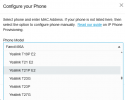
1761564368843.png

The other possibility is that they can still be provisioned as new hot desking phones (despite being EOL), in which case something is broken at my end :(.
 
Last edited:
This thread has been moved to the Yealink forum, but I think it belongs in the main PBX forum as it's about the PBX, not the phones.

Could a mod have a look and consider moving back please?
 
This thread has been moved to the Yealink forum, but I think it belongs in the main PBX forum as it's about the PBX, not the phones.

Could a mod have a look and consider moving back please?
Hi,

I get how you see it fitting on the main section, and I did debate whether to move it or not. In the end I believe it will just get lost there - having it here will bring it across the eyes of the right people faster, even if less people overall see it.
 
Hi,

I get how you see it fitting on the main section, and I did debate whether to move it or not. In the end I believe it will just get lost there - having it here will bring it across the eyes of the right people faster, even if less people overall see it.
No worries - I thought the right eyes might be 3CX staff, as I suspect this is housekeeping rather than a real problem.
 
  • Like
Reactions: KyriacosS_3CX
Hi Lee,

You can paste the prov. link in the phone manually and bring it up as a hot desking phone if you need it. After that, it should be able to log in and out normally as before.

They're indeed EOL and due for replacement but for now they are still mostly functional minus the initial remote auto provisioning.
 
Hi Lee,

You can paste the prov. link in the phone manually and bring it up as a hot desking phone if you need it. After that, it should be able to log in and out normally as before.

They're indeed EOL and due for replacement but for now they are still mostly functional minus the initial remote auto provisioning.

Thanks @JohnS_3CX but I believe I might have discovered a bug that is not strictly a Yealink issue.

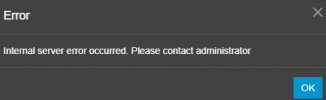
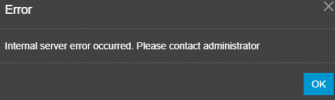
If I try to upgrade the firmware of an unsupported phone I receive "Internal server error". Following this I am unable to upgrade the firmware of any phone, even supported ones, and they return the same error. If I restart our PBX I can upgrade the (supported) phones again but as soon as I try to upgrade an unsupported phone I am no longer able to upgrade any phone again until the PBX is once again restarted.

Is there a workaround for this other than restart the PBX and don't ever try to update an unsupported phone?


Steps to reproduce

Upgrade a supported phone:

1761839754158.png

Success! (as expected)

Upgrade an unsupported phone:

1761832927001.png

Failure (as expected?)

1761832723998.png

Upgrade a supported phone:

1761839529851.png

Failure (unexpected)

1761839569608.png

Unable to upgrade any further supported phones until PBX restarted


Thanks for any help with this.

edit: Bulk updating firmware also fails on supported phones under the same circumstances, but without any error message.
 
Last edited:
Hi Lee,

Thanks for reporting it. Please try the following:

1. Phones > Options > Unsupported Firmware > OK
2. Phones > Options > 3CX Supported Firmware > OK
3. System > Updates > Download your firmware
4. Deploy the firmware on the phones

This should clear and redownload the firmware, clearing any errors to get you through the upgrade.
 
Hi Lee,

Thanks for reporting it. Please try the following:

1. Phones > Options > Unsupported Firmware > OK
2. Phones > Options > 3CX Supported Firmware > OK
3. System > Updates > Download your firmware
4. Deploy the firmware on the phones

This should clear and redownload the firmware, clearing any errors to get you through the upgrade.

Thanks @JohnS_3CX - that seems to have cleared the error and I am able to upgrade the supported phones again.
 
  • Like
Reactions: JohnS_3CX

Members Online Now

No members online now.

Forum statistics

Threads
111,831
Messages
589,277
Members
164,660
Latest member
RJenkinsROCK