Solved Yealink phones not provisioning

Status
Not open for further replies.

Dominique_CH

SMB User
Advanced Certified
Joined
Mar 20, 2020
Messages
84
Reaction score
15
I have a strange effect since the upgrade to V18: Yealink phones are not being provisioned:
- new local IP-phones aren't recognized an won't appear on the phones page, even after a manual firmware upgrade
- phone behind an SBC are recognized, but assigning them a configured extension doesn't have any effect: the phone remains marked as new. Its fw-version is 96.85.0.5, supposed to be compatible w/ V18
How can I identify the reason for this problem and resolve it?
Note: the PBX hasn't been restarted since v16 to V18 upgrade
 
  • Like
Reactions: CentrexJ
As I just tried to install several Yealink T54W today, I can confirm this Issue for the use of the SBC.

Some details for my setup:
3CX-Version: 18.0 Update 1 (Build 237) - hosted by 3CX
Yealink phone: T54W, FW 96.85.0.5 and 96.86.0.23 (recommended)

All of the phones are shown as new but nothing happens if I assign them to an extension. I also tried putting the provisioning URL in the phone but that doesn't work either. The phone doesn't get a configuration and there are no accounts visible on the phone's GUI.

As there are no problems when I reset a Fanvil X4G, I would say that my setup should be okay. Neither the initial provisioning nor the reprovisioning after changing the BLF caused any problems.
 
Last edited:
As I just tried to install several Yealink T54W today, I can confirm this Issue for the use of the SBC.

Some details for my setup:
3CX-Version: 18.0 Update 1 (Build 237) - hosted by 3CX
Yealink phone: T54W, FW 96.85.0.5 and 96.86.0.23 (recommended)

All of the phones are shown as new but nothing happens if I assign them to an extension. I also tried putting the provisioning URL in the phone but that doesn't work either. The phone doesn't get a configuration and there are no accounts visible on the phone's GUI.

As there are no problems when I reset a Fanvil X4G, I would say that my setup should be okay. Neither the initial provisioning nor the reprovisioning after changing the BLF caused any problems.
@tenorchris Start a separate thread please - read here before you do
 
Hi @Dominique_CH

You have two separate issues lets break them down individually:

1. Local Issues
new local IP-phones aren't recognized an won't appear on the phones page, even after a manual firmware upgrade

Firstly ensure that the PBX has only a single NIC. If you have more than one let me know if there is a reason for this otherwise uninstall other NICs entirely from your machine and restart it.

Secondly, when you factory reset a phone (this is mandatory) the phone will send a PnP message that will make it appear in your phones section. But this will only happen if the PBX and phones are on the same network range, and only if you allow multicast messages on your network. Without this, you will never see the phones. Verify these things before you do anything else

2. SBC Issues
phone behind an SBC are recognized, but assigning them a configured extension doesn't have any effect
The SBC will notify the phone with a URL pointing to your PBX, so the phone can go download its provisioning files. If the phone cannot reach the internet, it will fail. If the firmware is too old, it can also fail. If the time/date is wrong on the phone it can also prevent provisioning. And if the PBX does not have the correct ports forwarded so that the phone can reach it, it will again fail (I think this port is OK since your SBC is up and running - so check the rest)


3. Firmware Issues
Its fw-version is 96.85.0.5, supposed to be compatible w/ V18
You haven't told us what model your phones are so we don't know if is the correct version.
My guess is that it's not what you think because we don't currently serve such a version
Check again: https://www.3cx.com/support/phone-firmwares/
 
Hi @Dominique_CH

You have two separate issues lets break them down individually:

1. Local Issues


Firstly ensure that the PBX has only a single NIC. If you have more than one let me know if there is a reason for this otherwise uninstall other NICs entirely from your machine and restart it.

Secondly, when you factory reset a phone (this is mandatory) the phone will send a PnP message that will make it appear in your phones section. But this will only happen if the PBX and phones are on the same network range, and only if you allow multicast messages on your network. Without this, you will never see the phones. Verify these things before you do anything else

2. SBC Issues

The SBC will notify the phone with a URL pointing to your PBX, so the phone can go download its provisioning files. If the phone cannot reach the internet, it will fail. If the firmware is too old, it can also fail. If the time/date is wrong on the phone it can also prevent provisioning. And if the PBX does not have the correct ports forwarded so that the phone can reach it, it will again fail (I think this port is OK since your SBC is up and running - so check the rest)


3. Firmware Issues

You haven't told us what model your phones are so we don't know if is the correct version.
My guess is that it's not what you think because we don't currently serve such a version
Check again: https://www.3cx.com/support/phone-firmwares/
Hello John,
Here my replies:
1. Local Issues: the PBX indeed has 2 NICs, 1 for the local LAN and a 2nd via an USB-LAN adapter for the dedicated SIP-operator network. However, both the new phone and the PBX are on the same local subnet. I already tried factory resetting the Yealink T53 phone (after a manual firmware upgrade), but that doesn't change the picture
2. SBC issues: we have 4 other IP-phones already configured (under V16) which work correctly. The new phone is recognized and appears as new (see attachment), but assigning it an existing, unused extension has no effect whatsoever. Its firmware is 96.85.0.5, which should be no problem though it is not marked as "unsupported" and no (phone) updates are indicated as being available
3 Firmware: the local T-53 phone has been manually upgraded to 96.86.0.23, the one behind the SBC is on 96.85.0.5
Finally, the PBX is running the latest version 18.0.237
 

Attachments

1. In this case you need to make sure the second NIC does not have a default gateway set.
This is a requirement to ensure that the correct NIC is always the main one.
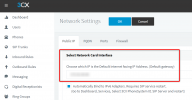
Then, the main one which has a default gateway, should also be selected here if you haven't already done so:
1635241915742.png

Restart your machine after these operations!

2. Send me your FQDN in a private message so I can check something
 
Hello SteveITS, Yes,

1. In this case you need to make sure the second NIC does not have a default gateway set.
This is a requirement to ensure that the correct NIC is always the main one.
Then, the main one which has a default gateway, should also be selected here if you haven't already done so:
View attachment 25435

Restart your machine after these operations!

2. Send me your FQDN in a private message so I can check something
This setting is already set correctly.

And am I supposed to respond to you privately? Via email ?
 

Attachments

Are you using a custom SSL cert? If so, is the intermediate cert in the chain?

If you disable Trusted Certs in Yealink settings does it work?
 
No, I'm using standard 3CX-certificates
 
In addition to checking if it will provision with trusted certs disabled can you check if there is a URL in the server URL field and if that URL is accessible on the same network as the phone? You'll need to add mac.cfg to the end of it to actually get the CFG file.

Also confirm this phone has been factory reset and has no non-default settings in it.

The steps in manual provisioning here https://www.3cx.com/sip-phones/manually-provision-yealink/ show you how to set (or in this case check) the URL.
 
Last edited by a moderator:
I did as told by John and renewed the 3CX-SSL certificate. I even restarted both the PBX and the local phone, but no luck: there's no change and the phone still isn't provisionning.
I even tried provisionning the phone manually using the 3CX-provisioning link from the phone GUI. On the phone subnet, the FQDN is translating correctly to the local PBX-address. What could I try next ?
 
Here's an overnight update: the local phone finally did provision manually ;).
I have just one problem left with a new phone located behind an SBC which doesn't show up anymore in the phones' list since PBX was restarted ....
 
I will try next week connecting a new test SBC and a new phone to this PBX to check whether I can reproduce the issue
 
  • Like
Reactions: NickD_3CX
I finally got the phone behind the SBC configured: after resetting it to factory settings, it reappeared on the phones' list and I managed to assign it the correct extension this time.

So, I can confirm both issues being due to a bad SSL-certificate following the Let’s Encrypt – DST Root CA X3 Expiration. After forcing its renewal and resetting the phones to be configured, all went back to normal. ;)

Thanks for Chris' help :) - The case can be closed.
 
Status
Not open for further replies.

Members Online Now

No members online now.

Forum statistics

Threads
111,831
Messages
589,277
Members
164,660
Latest member
RJenkinsROCK