





A hotfix is now available for customers who have been affected by an expired root cross-signing certificate by Let’s Encrypt - one of the most popular SSL/TLS certificate issuers globally.
Who is affected and how
3CX configured the chain of certificates by following the popular project certbot, which is commonly used on web servers to obtain and configure Let’s Encrypt certificates. Although this works well for Chrome, Firefox, newer Android and iOS devices, in some cases IoT devices such as IP Phones, have shown compatibility issues.
The solution is to remove the latest certificate in the chain from the configuration. This might imply compatibility issues with older Android devices, namely 7.1.1 or older going forward.
3CX automatically updates certificates every 90 days. This means you might already have the updated certificate chain. If not however, you may experience any of the following limitations:
- IP Phone does not (re-)provision
- IP Phone does not load phone book entries or corporate logo
- IP Phone does not hotdesk to a new extension
To note, IP Phones need to be on the latest firmware version to comply with Let’s Encrypt’s new certificate chain. In preparation for this, we had contacted all our supported vendors around mid-year, to include the new certificate for active supported devices. If you have not updated to the latest firmware, you might need to update the firmware of your device manually. A list of firmware files can be found here.
It is worth mentioning that calling, BLF operation or TLS connectivity to SIP trunk providers were not impacted by this certificate change at any point.
Who should take action
- If you are “Hosted by 3CX”, you have already been taken care of.
- If you don't use IP Phones or are not facing any of the above limitations, you may stop here. (Within the next 90 days your system will automatically update the certificates with the new certificate chain.)
- If you are operating on custom domains, you will have to validate any impact and find a solution that works for your setup.
- If you or your customers are currently facing any of the limitations mentioned above, install the hotfix below. The below solution only applies to 3CX provided FQDNs and certificates.
Hotfix for V16 and V18
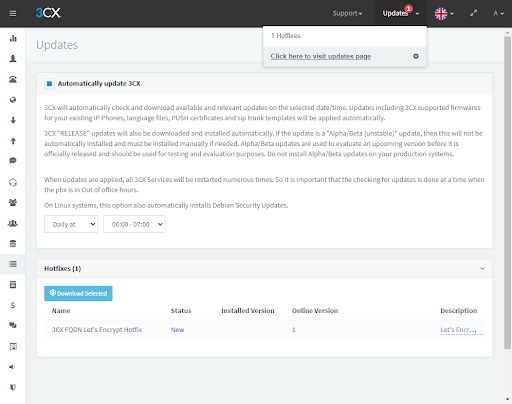
This hotfix is only available for customers running 3CX V16 and V18. To install the hotfix:
- Click on “Updates” in the 3CX Management Console
- Select “3CX FQDN Let’s Encrypt Hotfix”
Alternatively, this will be triggered automatically when “Auto Update” is enabled.









 Copyright © 2026