Yealink phones ringing through headset

Status
Not open for further replies.

Lee Cramman

Premier Customer
Advanced Certified
Joined
Jul 9, 2018
Messages
694
Reaction score
166
As per title, when our Yealink phones are over to headset mode they don't ring 'out loud' and you can only hear the ringtone through the headset.

Does anyone know a setting to adjust this behaviour as we're missing calls through not hearing them.

Currently using T-31P.
 
Eartec EAR510D.

However, the behaviour is there even if there is no headset connected.
 
Hi @Lee Cramman,

We don't provision that side of things when provisioning an IP phone, so I'd suggest contacting Yealink to see if they have any recommendations.
 
Hi,

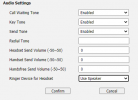
Please check using the Web UI if "Use Headset & Speaker" is selected.
Features > Audio > Ringer Device for Headset
 
Hi,

Please check using the Web UI if "Use Headset & Speaker" is selected.
Features > Audio > Ringer Device for Headset
WIll do. Sorry for delay in replying, I've been on annual leave :).
 
It's "Use speaker".

The options are "Use Headset" or "Use Speaker", there is no "Use Headset & Speaker".

1628524109461.png

Thanks
 
I've posted on the Yealink forum that the phone does not appear to honour the above setting.

I have found a workaround which is to set the phone to dual headset mode in the Web UI. However I have a lot of endpoints and manual configuration is going to be a painful process.

I did think about a custom template with this setting in but I'm not sure if custom templates are even possible with hot desk phones and it's also not clear which template to use as a basis...

If anyone has an idea that doesn't involve me manually configuring dozens of endpoints one at a time across multiple sites I would love to hear them!
 
Hi Lee,

If they are hot desking phones, you cannot run custom templates unfortunately.
 
There was something similar, a short while ago, where it turned out, the headset was plugged into the handset socket by the users (or vice-versa).
 
There was something similar, a short while ago, where it turned out, the headset was plugged into the handset socket by the users (or vice-versa).

Sadly not in this instance. Also, the SIP-T31P has a separate headset button and the behaviour occurs whether or not anything is plugged in (i.e. the behaviour is caused by using the button, not by plugging the headset in).

I suspect this is a Yealink bug.
 
I suspect this is a Yealink bug.
Before reporting this to Yealink support first try to reset the phone to factory default, but before you re-provisioning it, login and check if you can select one of the three Ringer Device settings.
According to the Admin Guide (v85.2 - p.156), 3 modes should be selectable.
 
I gave it a go but there are still only the 2 modes showing (i.e. no dual mode). I've had it suggested elsewhere that this behaviour is patched in a later firmware release. I don't see a lot of point in trying other firmware as I need to stick to something 3CX approved and rolling updated firmware out manually is going to be just as much of a PITA as manually applying a workaround - my best bet is probably to wait for 3CX to approve updated firmware for this phone.

I've also had suggestions from 3CX about a slightly easier workaround using DHCP option 66.

I know this is a newish phone but I'm surprised that I've struggled to find others with the same issue as me.
 
Status
Not open for further replies.

Members Online Now

Forum statistics

Threads
111,832
Messages
589,278
Members
164,662
Latest member
DejanMDS