Solved Yealink Phones showing incorrect time

Status
Not open for further replies.

JoshWS

Gold Partner
Advanced Certified
Joined
Mar 26, 2024
Messages
93
Reaction score
21
Some customers yealink T54W on firmware 96.87.0.16 are showing the incorrect time. Looks like they have gone into DST time a week early. Anyone know how to recify this without having to manually go into each devices web gui?

Cheers
 
Hi Josh,

Have checked that model on the latest firmware and the time is correct when checking time zones like Paris or London for example.

Yours appears outdated at the moment so cannot confirm if it will work as intended.
https://www.3cx.com/docs/phone-firmwares/
Might want to upgrade them, and check your provisioning settings:

- Phone Set to Global in user extension (using default template from Update 8)
- Extension belongs to a department
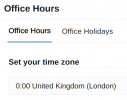
- Department has the correct time zone in Office Hours
1774273558744.png
 
  • Like
Reactions: JoshWS
Hi Josh,

Have checked that model on the latest firmware and the time is correct when checking time zones like Paris or London for example.

Yours appears outdated at the moment so cannot confirm if it will work as intended.
https://www.3cx.com/docs/phone-firmwares/
Might want to upgrade them, and check your provisioning settings:

- Phone Set to Global in user extension (using default template from Update 8)
- Extension belongs to a department
- Department has the correct time zone in Office Hours
View attachment 51284
Hi John,

Thank you for the quick response, looks like a firmware upgrade has done the job.
 
This seems to be happening on all our Yealink T46S phones as well. The T46U's are ok. All on the latest supported firmware (66.86.0.180 for T46S and 108.87.0.22 for the T46U). Timezone is set to use global settings which is GMT / London.
 
This seems to be happening on all our Yealink T46S phones as well. The T46U's are ok. All on the latest supported firmware (66.86.0.180 for T46S and 108.87.0.22 for the T46U). Timezone is set to use global settings which is GMT / London.

Sorry, the T4S series are end of life and their last firmware unfortunately contains the wrong DST data.

This means that even though 3CX sends the correct time zone data, the phone will not apply them correctly because the firmware makes the decision internally to move the time forward a week early.

You might want to contact Yealink directly for further help if you wish to venture into fixing them manually.
 
Sorry, the T4S series are end of life and their last firmware unfortunately contains the wrong DST data.

This means that even though 3CX sends the correct time zone data, the phone will not apply them correctly because the firmware makes the decision internally to move the time forward a week early.

You might want to contact Yealink directly for further help if you wish to venture into fixing them manually.
I thought that may be the case. We only have a few S phones left now so a good excuse for an upgrade :)

Thanks anyway.
 
  • Like
Reactions: JohnS_3CX
I can also confirm the modern T3, T4U, T5W, T7/T8 also run correctly so any of those should do fine!
 
Status
Not open for further replies.

Members Online Now

No members online now.

Forum statistics

Threads
111,831
Messages
589,277
Members
164,660
Latest member
RJenkinsROCK