Yealink SIPW60B management questions

Status
Not open for further replies.

A.Takacs

Bronze Partner
Joined
Apr 20, 2020
Messages
115
Reaction score
10
Hello

We have recently added a Yealink SIPW60B DECT base station (and W52H phone) to our 3cx setup and although it is working I have a few questions
  1. how do I as connect to the base station once it is provisioned ? The system gives me a user ID, pa sword and phone password - what combination should I use (I obviously have tried user ID + password and user ID + phone password but neither work) ?
  2. how do I define the language used in the phone ? other phones inherit the extension's setting but it does not seem to be available here ?
  3. same question for the time zone - the phone seems off by 1h - if I change on the headset it is immediately reset by the PABX
 
Hello

We have recently added a Yealink SIPW60B DECT base station (and W52H phone) to our 3cx setup and although it is working I have a few questions
  1. how do I as connect to the base station once it is provisioned ? The system gives me a user ID, pa sword and phone password - what combination should I use (I obviously have tried user ID + password and user ID + phone password but neither work) ?
  2. how do I define the language used in the phone ? other phones inherit the extension's setting but it does not seem to be available here ?
  3. same question for the time zone - the phone seems off by 1h - if I change on the headset it is immediately reset by the PABX
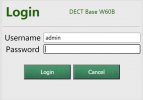
1. Use "admin" as username along with the "Phone Password". User ID and User Password are for SIP Registration and/or Webclient (depending which you're talking about.)

2. In the Advanced > FXS/DECT section, under the W60B base, you should be able to set the language there. It will be set on every handset registered to that base.

3. Could be a template bug. What timezone are you in, which one are you setting, and which one gets set on the phone?
 
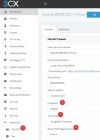
The credentials you saw under your extension are not related in any way to the W60 Base, so those will not work. Follow these instructions instead:
1626329508294.png
1. Access the device configuration from the FXS/DECT section
2. Set your Language here
3. Set your timezone here
4. View the device web UI password here. The username is always "admin".
1626329334746.png


Remember: If you make changes in the 3CX FXS/DECT page, press OK to save them, and then reboot the base station so it will reprovision itself with the new settings, otherwise they will not apply.
 
  • Like
Reactions: Evolute IT
Status
Not open for further replies.

Members Online Now

Forum statistics

Threads
111,832
Messages
589,282
Members
164,662
Latest member
DejanMDS