Yealink T-54W Router Phone Not Working as a Router Phone

Status
Not open for further replies.

klindsay

Silver Partner
Basic Certified
Joined
Sep 11, 2020
Messages
7
Reaction score
0
Hey All,

Since the V20 Direct Sip is going away, I ordered a Router Phone. I added this to my Ext. on a different internet so not to see our internal SBC. After it updates and comes back up, all BLF's are grayed out. The reason for this is to sell to users that need to take the phone home. This should provide the same as an SBC for those users. I have deleted the phone and factory reset a few times with no changes. No firewall. Line presents are showing and lit. any Thoughts.

Thank You
Ken
 
Hey All,

Since the V20 Direct Sip is going away, I ordered a Router Phone. I added this to my Ext. on a different internet so not to see our internal SBC. After it updates and comes back up, all BLF's are grayed out. The reason for this is to sell to users that need to take the phone home. This should provide the same as an SBC for those users. I have deleted the phone and factory reset a few times with no changes. No firewall. Line presents are showing and lit. any Thoughts.

Thank You
Ken

Could you share screenshots showing the steps to add your phone ?
Ensure that the Firewall Checker on 3CX PBX passes when you run it again.
 
Current 3CX firmware? Is it set to use itself as its SBC?
 
Make sure the firmware is on the most recent.
App phone to user, select connect directly.
Check logs to make sure PRS was delivered.
Reset phone, should come up get config, reboot then go online.
 
@klindsay

1. We need to know your exact firmware number

2. The phone needs to be connected via LAN, not via WiFi

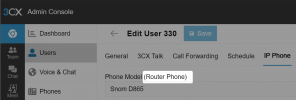
3. In the extension does it appear as a Router Phone?

1726047324578.png

4. Refresh and check license. BLFs will not light up if your license is expired on any of the phones.
 
@klindsay

1. We need to know your exact firmware number

2. The phone needs to be connected via LAN, not via WiFi

3. In the extension does it appear as a Router Phone?

View attachment 43757

4. Refresh and check license. BLFs will not light up if your license is expired on any of the phones.
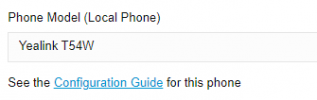
1726161262554.png
It does not say Router Phone. Our License is a Enterprise 14, I don't know what you mean about phone license? The phone is connected via LAN. Version: 96.86.0.81

Thanks
 
Last edited:
You’re running v14? Router phones were added halfway through v18.

Assuming it’s not v14, if you log in to the web client for that extension does it show the BLFs correctly?
 
You’re running v14? Router phones were added halfway through v18.

Assuming it’s not v14, if you log in to the web client for that extension does it show the BLFs correctly?
No, I am running V20.. the (14) means 14 simultaneous calls, Amd yes the BLF's are normal as this is a 2nd phone with the 1st being a SNOM D-785 with no issues
 
OK maybe 14 is the trunk limit then; 3CX sells 8SC and 16 SC.

When adding the phone did you select "connect directly"?
https://www.3cx.com/sip-phones/yealink-t5-series/#h.wmsoriilsyve
It looks like 3CX thinks it's local, per your image.

There isn't a phone license...read "BLFs will not light up if your license is expired on any of the phones" as, "if your 3CX license is expired your BLFs will not light up." (or "BLFs will not light up if your license is expired, on any of the phones")
 
yes, I did choose direct using the URL of the phone system. I did not choose manual setup... The license is good until 2034..
 
What do you mean by, "using the URL of the phone system?" You shouldn't need to enter anything in to the phone for this...

I don't think I see an answer about the firewall checker...?
 
What I meant by URL, when adding a new phone to 3CX, after choosing the brand and model, there is a drop down with the systems URL or IP address. The firewall is on in the system. I can control the phone from the system like updating or rebooting from inside 3CX. I can receive and make calls from the Yealink phone. I just have grayed out BLF keys on the direct connection. We have 30 phones inhouse and all is working great. Inhouse we also use a SBC for the 30 Phones. I just need to get the external phones working for other customers. we Have about 70 deployments of 3CX.
 
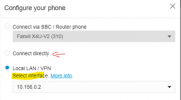
Are you talking about this dialog, and "local LAN/VPN"?
1726170526980.png
Don't select that, use "Connect directly" (faint radio button). Which is a weird way to spell "router phone" but that's how it's labeled.
 
@klindsay you are using the correct firmware, but the T54W was not configured as a router phone.

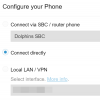
Delete it and add it again but this time make sure to pick "Connect Directly"
1726210338332.png
Then factory reset the phone and wait, it may reboot a couple of times and then it should come online working as expected.
 
Status
Not open for further replies.

Members Online Now

No members online now.

Forum statistics

Threads
111,831
Messages
589,277
Members
164,660
Latest member
RJenkinsROCK