Solved Yealink t26p incorrect password and user

Status
Not open for further replies.

perdicaro

Joined
Jun 1, 2013
Messages
26
Reaction score
0
Having supplied the telephone and took the username and password that gives 3cx I can not log in anymore remotely 192.168.1.11 in your phone to set it up, password defalut has changed and no longer accepts admin / admin, and even those that I assign 3cx from the panel, how can I do?
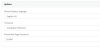
 
took the username and password that gives 3cx

The 3CX Phone system changes the default password to a new one for security reasons.

no longer accepts admin / admin, and even those that I assign 3cx from the panel

Did you try to change the phone web page password on tab Phone Provisioning and re-provision it?
 
yes, but password incorrect again
 
Did you go to the phones tab and reprovision the phone?
 
Please note, supported browsers to login on your management console are Chrome, EDGE and Firefox. Did you use one of them?
 
i use crhome, i try again whit the password and username than 3cx console give me, no workin, try also to reset yealink and reinstall 3cx reprovisoring no work
 
The username is admin and the password is on the Phone Provisioning tab, the login is NOT the credentials on the first tab in the Extension options.
 

Attachments

  • Capture.PNG
    Capture.PNG
    8.8 KB · Views: 42
ok now i take the correct password from "Phone Web Page Password" Thnx jbryant84! now work:)
 
Last edited:
Status
Not open for further replies.

Forum statistics

Threads
111,852
Messages
589,391
Members
164,691
Latest member
Daz1964