Yealink T27 Answering Smart Phone Calls After Network Update

Status
Not open for further replies.

[email protected]

Premier Customer
Joined
Jun 17, 2015
Messages
84
Reaction score
21
We have installed new hardware and separated our corporate offices from the data center with a new network. Our on prem 3CX install is in our data center and we are able to send/receive calls from it just fine in the building.

The issue I'm running into is an odd one. I have a VPN user who is offsite. They have a T27 Yealink phone on their desk on the new office network. If he answers his soft phone over the VPN the Yealink picks up on his desk. Unplugging his desk phone is the short term solution to keep him working without issue.

Has anyone seen anything like this? We've been reviewing configurations on both the phone and 3CX and can't seem to find anything wrong.
 
Last edited:
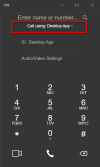
The softphone allows you to select whether you want it to answer calls or whether you want your phone to answer the calls:

1683013443186.png

So click there and select the app instead of the phone from the drop down.
 
The user is set to Desktop App.

We all made sure it was set to the right thing in Settings -> Audio/Video for "use this device for calls".

We also went through the phone configurations in 3CX and didn't find anything that stood out to us.
 
Hmm that makes absolutely no sense then.. For the phone to answer the call on its own, it needs to receive a command from 3CX.
If your desktop app is set to "Desktop App" rather than "Yealink T27" then there really is no justification as to why this happens.

Check whether perhaps the user has also logged into the webclient simultaneously along with the Desktop app. Because if they are answering the call from the webclient pop-up (thinking its part of the app), and meanwhile the webclient is actually set to "Yealink T27", then that would justify what we are seeing. In this case, just have them log out of the webclient since they are using the Desktop App anyway, not point in in being logged in twice.

Hope this solves the mystery!
 
Also not sure if I missed something here, but please tell me what you meant by softphone - sharing a screenshot helps!
 
We're not using the web portal. We have everyone using the 3CX Desktop App, version # 18.12.425. This is the latest release after we had to uninstall it and use the web page for a couple of weeks due to the attack.

I'm not coming up with any good info to add to this. I've done a lot of work on 3CX in the past 5 years and the only item I can think of is to check the "pbx delivers audio" box since it likes to magically fix things. I couldn't find anything in the templates and I can't seem to find any difference between users that are working vs not working. Extension, Phone configs, permissions, inbound/outbound rules, I don't see any issues.

I think my next step is going to be to do some wireshark captures and to update the verbosity on the 3CX log to see if I can pull anything from there. I may just blame it on being an out of date phone. We've been phasing out desktop phones and this may be an excuse to accelerate that work.
 
I feel there are some missing details somewhere though, as the behavior of the phone doesn't really make sense in this case.

We're not using the web portal. We have everyone using the 3CX Desktop App, version # 18.12.425. This is the latest release after we had to uninstall it and use the web page for a couple of weeks due to the attack.
But you still had to provision it somehow, and that requires logging into the webclient. Could it be the case that they are still logged into their browser session (Chrome or Edge) ?

Or could have they enabled auto-answer in the phone?

Or perhaps they are using a specialty headset that connects both to PC and phone (they can instruct the phone to answer) ?

Just wondering if it would be possible for you to see it in person, as sometimes things reported by users who are not familiar with the details might skip over something important.
 
The user is onsite today and I've done some testing while going over your questions. I can now say that the problem occurs all the time no matter where he is. It was my mistake for thinking it was him being offsite. I also can't verify how long the problem has been happening. I think this is another problem that got blamed on our network updates this weekend.

The user can answer calls just fine using the 3CX phone app on his cell phone.

I tested everything in person and when he answers the soft phone his desk phone comes on. The user does not have a headset. We're currently out and he's waiting on one. I'm thinking that not having a headset is part of the issue. I'll continue testing once we get him one and try to phase out his desk phone in general.

Thank you for the response.
 
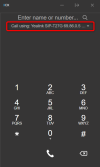
I think the only remaining possibility here is that the user is logged into more than one 3CX app, and one of them has the Yealink selected instead of the Desktop app in at least one of them:
1683120013876.png

We do have quite a few apps that can work simultaneously:
- 3CX Webclient (runs in a regular browser tab)
- 3CX Desktop app (Windows/Mac)
- 3CX PWA app (runs using Chrome/Edge in background)
- 3CX Phone for Windows (our old legacy app)
- The Android and iOS apps - which should not be a problem but technically the user may have logged into their extension from their mobile phone using the webclient or PWA instead of the native app - it's actually possible and you did say it happens when answering smartphone calls too in the title

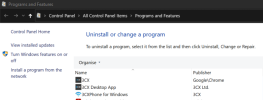
I think it's worth investigating to see what is on their PC: log them out of Chrome, Edge, or other browser, then uninstall any 3CX products that appears in Windows "Programs and Features"
1683120297111.png

And then also check their smartphone to see whether they installed the webclient / PWA app instead of our native Android app.

Finally, log them into the webclient from their PC and see if the problem went away.
 
The Smartphone in the title is a mistype on my part. I meant to put soft phone in there.

I've gone over his PC again and I can't find any other instances of 3CX running. I haven't gotten time with him to further test his webclient. Once he gets his head set we'll double check everything. But at this point he's agreed to get rid of his desk phone.

If I find a technical answer I'll post it here. Thank you for the assistance.
 
  • Like
Reactions: JohnS_3CX
This is a followup to this problem.

The new headset works fine for the user and they no longer use a desk phone. I never found an answer to this issue but my best guess is either his soft phone was misconfigured somehow or his 3CX phone app was part of the problem.
 
  • Like
Reactions: JohnS_3CX
Status
Not open for further replies.

Members Online Now

Forum statistics

Threads
111,832
Messages
589,285
Members
164,662
Latest member
DejanMDS