Yealink T3, CP, T4, T5 & AX IP Phone Firmware Updates

AramS_3CX

Support Team
Staff member
Joined
May 7, 2012
Messages
198
Reaction score
94

V20 U5 maintenance updates for regular and router Yealink phones.​

The latest IP Phone firmware updates for Yealink - containing maintenance updates - have been released and are fully tested with V20 Update 5.

Yealink Firmware Updates for V20 Update 5​

Normal Phones
  • T3 Series - T30P,T31G,T31P,T31W,T33G,T33P,T34W
...
Continue reading the Original Blog Post.
 
Last edited:
Maybe its just me, but manual Firmware Update of linked files gives "Invalid Rom" on Yealink T54W
Maybe. In my case I was able to upgrade the T54W. Check if you have other models too just in case it was that one phone. The upgrade assumes you were using our previous official version. Why not upgrade from your 3CX server directly?

(MD5 hash of T5XW-96.87.0.16.rom: 951eb50cdca387a2fa34f42e4266bb71)
 
Maybe. In my case I was able to upgrade the T54W. Check if you have other models too just in case it was that one phone. The upgrade assumes you were using our previous official version. Why not upgrade from your 3CX server directly?

Im just in a small deployment with brand new Devices.

Firmware Version
96.86.0.75
Hardware Version
96.1.2.0.2.1.2

I want to apply the Firmware before because otherwise i have to do a factory reset again for DST Fix..
 
Im just in a small deployment with brand new Devices.

Firmware Version
96.86.0.75
Hardware Version
96.1.2.0.2.1.2

I want to apply the Firmware before because otherwise i have to do a factory reset again for DST Fix..
I see you are on an older version. The update is only tested for devices coming from our previous stable version here
Try installing that first, and then the final version.

If your phone does not accept it, please contact Yealink Support directly so they can assist you with the upgrade. We do not test any specific hardware revisions, this is something that Yealink does before releasing the firmware to us.
 
Just a quick one, The change of the end call button placement, in the new firmware, is this something that 3CX can fix by a template change or do we need to go to Yealink?. It moves the end call button from the front screen into a togglable button which is frustrating.
 
Just a quick one, The change of the end call button placement, in the new firmware, is this something that 3CX can fix by a template change or do we need to go to Yealink?. It moves the end call button from the front screen into a togglable button which is frustrating.
You would have to speak with Yealink as this is a decision they made for V87 and they manage the firmware and templates. I do get you though, we are creatures of habit and it can be annoying :)

I would recommend to start using the X button under the arrows, it's a dedicated end call button rather than the context sensitive soft-key we were used to using before.
 
Happy, it was just a handfull T54Ws today.

This is just my experience.

I Know, Yealink does the Firmware, not 3cx, but as a Partner you should know.

Deployment with newest firmware,
is a bit time-consuming, somehow v87 does not work with manual upload of stock in box firmware phones so you have do the manual Update to V86 81 to get Router Phone Working and then to V87 and do a Factory Reset for DST Fix which requires to Enter a Admin Password ( via the T5 Keyboard ) on Device only after that it starts with RPS.

Note: This only appllies if provisioning is done with RPS, if provisioning is done via dhcp66, v87 provisions without manual interaction.
 
Last edited:
it does not work with the stock in box firmware
This is nothing new, Yealink has a minimum FW requirement before you jump to the latest version. It was just a bit unlucky that the stock you bought had a slightly older version. If the stock FW was bit older you may have had to install 2-3 updates in a row before you can reach the final so maybe you were not so unlucky after all. Note: We always confirm with Yealink that our previous FW will upgrade to the next so you only have to do this the first time.

so you have do the Update to V86 81 to get Router Phone Working and then to V87 and do a Factory Reset for DST Fix
You can install 96.86.0.81 that I shared earlier, then V87. Once this is done, add the phone in 3CX and factory reset it. The phone will pick up the config from RPS and you will not need to enter any passwords or have to worry about the DST issue. Just give it a few moments after the reset and you will see it rebooting, password screen aside.

Note: This only appllies if provisioning is done with RPS, if provisioning is done via dhcp66, v87 provisions without manual interaction.
I can confirm that RPS provisioning will bypass the password requirement, if you do it in the order I mention above.

PS: For large deployments, Yealink provides ways for you to apply upgrades, and even set VLAN using DHCP options and your own temporary config server. Get in touch with them and I'm sure they can advise and provide the tools.

Hope the above is helpful for future readers and deployments.
 
Just a quick one, The change of the end call button placement, in the new firmware, is this something that 3CX can fix by a template change or do we need to go to Yealink?. It moves the end call button from the front screen into a togglable button which is frustrating.

It's easy to change the DDS keys (programable key: the first 4 buttons when not calling) via custom template - we use this to remove the menu buttons (and others) in hotel enviourments. Careful, custom template = phones overview always red = no 3CX support.

Yealink said it's also possible change the keys while calling, but it's alot more complex and alot of work, so we ditched that :). If you really want to change those keys you'll have to contact Yealink support.

If you want to give it a go: https://support.yealink.com/en/portal/knowledge/show?id=64995b6f6a27da76bd0719ca
 
Last edited:
  • Like
Reactions: JamieLewisIBT
I’m looking for a way to be notified when new updates are released for IP phones. Does anyone know if there’s an RSS feed for this, or any other method (email alerts, webhooks, etc.) that can be used to stay updated?

Would appreciate any suggestions!
 
Is there a way to auto-update firmware on a schedule? My 3CX has something like 200 phones -- real pain in the ass doing 5 at a time and then come back every 5-10 minutes to refresh, select 5, click upgrade...
 
Just a quick one, The change of the end call button placement, in the new firmware, is this something that 3CX can fix by a template change or do we need to go to Yealink?. It moves the end call button from the front screen into a togglable button which is frustrating.

Did you find a solution to this?
We don't always update the phone on day 1 and I just updated one phone to test and immediately noticed this.
This is annoying. No-one ends a call using the X-button on the phone itself. The 'End Call' has a red background, reallys stands out etc. I can't really understand why that button has moved. What is 'shield on' and 'shield off' anyway? :)

It seems I could create a custom template in 3CX and changes these settings:
#Enable or disable customizing the softkey layout; 0-Disabled (default), 1-Enabled;
phone_setting.custom_softkey_enable = 0

#Customize the softkeys presented on the phone LCD screen when Callfailed, Callin, Connecting, Dialing, Ringback and Talking.
#Before using these parameters, you should store the desired XML files to the provisioning server.
custom_softkey_talking.url =

And create the XML-file using the instructions @Voiceking.be provided.
But I'd rather not create a custom XML-file if I don't have to.
So, I was just wondering if you had contacted Yealink Support and what their response was?


Edit:
it appears there is no way to turn off the 'shield off' button :-)
If I go here:
1746620286133.png
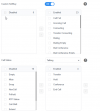
I can edit the buttons just fine. But as you can see, the 'shield off' isn't mentioned there.
If I remove for example 'conference', there are still 4 softkeys displays: transfer, conference, end call, shield off.
So it does fit on one page again then, but then the 'conference' will be missing and 'shield off' will be added anyway....
(what does that button even do...)
 
Last edited:
I can confirm that using these links to get to 96.86.0.118 allowed me to upgrade to 3cx 96.87.0.16
 
Did you find a solution to this?
We don't always update the phone on day 1 and I just updated one phone to test and immediately noticed this.
This is annoying. No-one ends a call using the X-button on the phone itself. The 'End Call' has a red background, reallys stands out etc. I can't really understand why that button has moved. What is 'shield on' and 'shield off' anyway? :)

It seems I could create a custom template in 3CX and changes these settings:
#Enable or disable customizing the softkey layout; 0-Disabled (default), 1-Enabled;
phone_setting.custom_softkey_enable = 0

#Customize the softkeys presented on the phone LCD screen when Callfailed, Callin, Connecting, Dialing, Ringback and Talking.
#Before using these parameters, you should store the desired XML files to the provisioning server.
custom_softkey_talking.url =

And create the XML-file using the instructions @Voiceking.be provided.
But I'd rather not create a custom XML-file if I don't have to.
So, I was just wondering if you had contacted Yealink Support and what their response was?


Edit:
it appears there is no way to turn off the 'shield off' button :-)
If I go here:
View attachment 47756
I can edit the buttons just fine. But as you can see, the 'shield off' isn't mentioned there.
If I remove for example 'conference', there are still 4 softkeys displays: transfer, conference, end call, shield off.
So it does fit on one page again then, but then the 'conference' will be missing and 'shield off' will be added anyway....
(what does that button even do...)
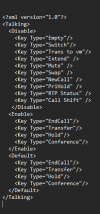
@noord. How did you go with this? I have been struggling to get the End Call Button moved. I've enabled the option to customize softkey layout and have created the following XML file for the Talking State. My issue is I'm not sure where to save the xml file to then be able to reference it in the following:

custom_softkey_talking.url =

I did try dropping the xml file into our webhosting and referenced the URL... but the config does not seem to apply.

Screenshot 2025-06-18 111115.png
 
Hello,

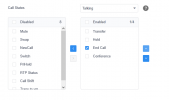
I managed to move "End Call" one position up in order to have it reappear in my T48U under Settings >> SoftKey Layout >> Custom Softkey (ON) >> Call States >> Talking.
 

Attachments

  • call_states.png
    call_states.png
    12.7 KB · Views: 25

Latest Posts

Forum statistics

Threads
111,932
Messages
589,807
Members
164,805
Latest member
Diana Paladutsa