Solved Yealink T31P Password Unknown when provisioned???

Status
Not open for further replies.

khoiusa

New User
Joined
Oct 11, 2021
Messages
43
Reaction score
2
I recently set up my brand new yealink T31P into the 3CX network, however, when I try logging into the web interface, it wont let me in since I have the wrong password. I have the username as admin and when I checked the 3CX management console with the yealink T31P interface password, it is correct. I even tried changing it but it still didn't let me in. Does anyone know how to fix this issue? Thanks.
 
Did you tried admin/admin? Is the phone correct provisioned?
 
Yes, I provisioned it by adding the phone through a user, entering the MAC, resetting the phone, and the entering the username and password 3CX gave me on the phone. It can receive and make calls.
 
Hi,

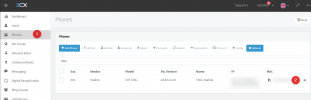
1. Go to Phones

2. find your device and click the eye icon

1634023671556.png


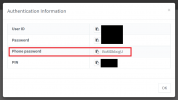
You must then use the password that appears here, not any of the other ones
1634023771032.png


Can you check and let us know if this works for you?
 
Yep! It works, thanks!
 
  • Like
Reactions: JohnS_3CX
Status
Not open for further replies.

Members Online Now

No members online now.

Forum statistics

Threads
111,831
Messages
589,277
Members
164,660
Latest member
RJenkinsROCK