Yealink T40G Firmware

Status
Not open for further replies.

Scott EIT

Bronze Partner
Basic Certified
Joined
Jan 29, 2019
Messages
209
Reaction score
18
Hi,

Can't see any firmware for the Yealink T40G. Is this phone still supported? It's for an on premise installation running 18.0 (Build 418).

Have factory reset but don't see the phone appearing in the Phones section.
 
According to our documentation, the T40G is still supported :https://www.3cx.com/sip-phones/yealink-t4-series/

You should be able to provision it to a locally installed 3CX System via PNP, providing the multicast messages sent from the device used for PNP can reach the 3cx system machine.

I would therefore suggest checking that you don't have DHCP option 66 enabled on the network so that the phone is not picking up a provisioning URL before it sends this or that the IP Phone has not previously been set to a remote provisioning method like Stun or SBC, where it will try to pick up the configuration from the previously configured extension that it was connected to.

Then also, if the phone is not on the same VLAN as the 3cx System, you may need to enter the provisioning URL directly using the phone web interface and after manually adding it to the extensions settings > phone provisioning tab.

Although as a first step, I can suggest upgrading the 3CX System to the latest support version of 18 updates 7 (Build 312).
 
  • Like
Reactions: Scott EIT
Thanks Charles. PNP should be working but I'm not seeing it appearing as a new phone unfortunately. Don't have option 66 enabled on the network and we're certainly on the same VLAN.

I think you may have hit upon something though with the phone being previously set to STUN on a different instance that's now unused. Is it possible the MAC address maybe registered on the previous installation/RPS? I started the phone up earlier before it was factory reset so imagine this might have registered it again.
 
Hi

For this, you will need to open a support ticket through your partner portal so we can request the details for us to check for you.
 
  • Like
Reactions: Scott EIT
Hi

For this, you will need to open a support ticket through your partner portal so we can request the details for us to check for you.

Thanks Charles, I'll do that. Incidentally, what's the correct firmware version and where can it be downloaaded from?
 
The firmware can be located here.
 
Any chance 3cx to update this firmware to the latest version releases of Yealink?
T40G-76.84.0.160 was released 09/2023 from yealink
T40G-76.84.0.95 which is based on T40G-76.84.0.90 is 4 years old and has no support for YDMP&YMCS which makes life a bit difficult when you have to manage a a big number of them...
 
..
T40G-76.84.0.95 which is based on T40G-76.84.0.90 is 4 years old and has no support for YDMP&YMCS which makes life a bit difficult when you have to manage a a big number of them...
Hello,

That is not correct; we use it on Yealink T40G models with actual 3CX firmware version.

1. Supported Firmware.
Yealink device management platform supports the management of the following devices:
SIP IP Phones: SIPT19(P)E2/T21(P)E2/T23P/T23G/T27P/T27G/T29G/
T40P/T40G/T41P/T41S/T42G/T42S/T46G/T46S/
T48G/T48S/T52S/T54S. Version: XX.83.0.30 or later. …
[
link]
 
Well, we can't since version 76.83.0.55

And bellow is a screenshot from yealink site

1706522144966.png
 
Well, we can't since version 76.83.0.55

And bellow is a screenshot from yealink site

View attachment 39417

Have you tried it? 3CX has their own firmware, it’s possible that Yealink removed it from their xx.95 firmware for Yealink but it works on 3CX version..

I will double-check, but I am certain that I have T40G devices on the official 3CX firmware that work with YMCS. All our devices have been synced with YMCS for a long time.

I’ll get back to you.
 
Have you tried it? 3CX has their own firmware, it’s possible that Yealink removed it from their xx.95 firmware but it works on xx.90..

I will double-check, but I am certain that I have T40G devices on the official 3CX firmware that work with YMCS. All our devices have been synced with YMCS for a long time.

I’ll get back to you.
I've tried. Only RPS works but YMCS will not. T-40G are always OFFLINE. No problem with any other models
I will try different firmware (not 3cx official once) but since upgraded from 76.83.0.55 to 76.84.0.95 T-40G never been ONLINE on YMCS for us
 
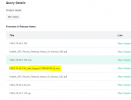
IMG_4639.jpeg

In a total of 1.22K devices, ironically, I only have 4 T40G devices LOL, and indeed, they are offline.

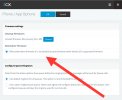
Have you tried using "Third Party Firmware" in 3CX?
IMG_4640.jpeg
 
Well, T40G won't accept newer firmware and I don't even want to start looking for the reason. Looks like Yealink just buried them and I don't blame them. I would do it too but clients like what they have. So either more manual work or revert to older firmware - I will role the dice :D

Thanks for the involvement. I wish I had just 4 of them too :D
 
  • Like
Reactions: Guillaume Bourgeois
Status
Not open for further replies.

Forum statistics

Threads
111,832
Messages
589,284
Members
164,662
Latest member
DejanMDS