Yealink T40G - No Service - Invalid Account

Status
Not open for further replies.

thereverendd

Free User
Joined
Mar 31, 2019
Messages
66
Reaction score
5
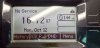
I have just set up my T40G and was able to have it provision AUTO by putting in the provisioning link. The phones FIRMWARE is up to date
but the phone displays. I have OTHER phones on the same network and they are working 100%. This one the only one with an issue. Can someone help
me get this up and running? Please and Thank you

T40g1.jpg
 
So it looks like it provisioned, but didn't register. I'm guessing it's setup as STUN and you didn't uncheck the box 'Disallow use of extension outside the LAN' for that extension. Looking in the logs you should see indicators of this.
 
That was one of the 1st things I did. Also in the phones list it is not showing the phone either.
1602544815280.png
 
Not sure if this helps but this is what the log says

1602545164699.png
 
It will only show the phone in the phone list if it's registered. Since it's not registered, it won't show in the list. I'd try to factory reset the phone again.
 
Check 3cx blacklist records and delete any records

Make sure you have entered the phone MAC address correctly

Factory default the phone, and enter the ext number and voice mail pin to configure the phone https://www.3cx.com/sip-phones/yealink-t4-series/. - Remote phones: Provision via RPS server
 
Last edited:
  • Like
Reactions: JohnS_3CX
I'd be surprised if it's on the blacklist as the OP says there are other phones on the same network (and presumably with the same internet connection) so if the IP was blacklisted then they would all not work.
 
Status
Not open for further replies.

Latest Posts

Forum statistics

Threads
111,964
Messages
590,008
Members
164,870
Latest member
nizammoktar