- Joined
- Mar 5, 2021
- Messages
- 58
- Reaction score
- 15
Hi,
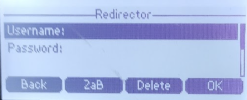
I am currently encountering an issue whereby the 'Enter Login Credentials' screen continues to pop up intermittently throughout the day (approx. 3/4 times a day) despite the device being provisioned successfully and working without issue once the prompt is cancelled.
This is affecting all Yealink T42's on-site (approx. 40).
As mentioned, once this prompt is cancelled, the phone operates without issue though this is becoming an annoyance for users.
I had read that this could potentially due to the phones being provisioned via SIP on the previous system (though these are not provisioned via SBC on 3CX) and have attempted to remove these from the Yealink RPS directly though this has not served to alleviate the issue.
Has anyone encountered this before? And, if so, could offer any advice on how to resolve?
I look forward to hearing from you!
All the best,
Reece
- 3CX Version, Enterprise Annual 18.0
- Is the 3CX Server Hosted and where: Hosted on Amazon Lightsail
- IP Phone Make/Model/Firmware: Yealink T42S (66.86.0.5)
- Provisioning Method: SBC version 18.1.36
- Trunk Provider or Gateway Make/Model: Gamma
- Has the Firewall Checker passed: YES
- Are custom Phone Templates being used: NO
I am currently encountering an issue whereby the 'Enter Login Credentials' screen continues to pop up intermittently throughout the day (approx. 3/4 times a day) despite the device being provisioned successfully and working without issue once the prompt is cancelled.
This is affecting all Yealink T42's on-site (approx. 40).
As mentioned, once this prompt is cancelled, the phone operates without issue though this is becoming an annoyance for users.
I had read that this could potentially due to the phones being provisioned via SIP on the previous system (though these are not provisioned via SBC on 3CX) and have attempted to remove these from the Yealink RPS directly though this has not served to alleviate the issue.
Has anyone encountered this before? And, if so, could offer any advice on how to resolve?
I look forward to hearing from you!
All the best,
Reece