Yealink T42U Router Phone

Alphabetic

3CX MVP
Silver Partner
Advanced Certified
Joined
Jul 1, 2016
Messages
6,672
Reaction score
2,663
Hi

Is it possible to assign this phone to another extension without having to delete / add and then have to reconfigure every other extension to use this SBC?
 
Solution
@Alphabetic this option is available on U10. Check the blog here.
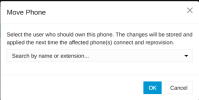
You can do on the Admin Console >> Phones, find the deskphone model that is assigned to an extension. Go on the right side on the 3 dots and select " Move Phone ".
A popup will come up and this will gve you the option to select the extension you want to assign it to.
Select the extension and click OK. Thats it.


1792067903232.png


1792067975264.png
Hi @Alphabetic that is not possible, you will need to delete the device and add it to the new user..
 
thanks, thought so.
 
  • Like
Reactions: Alejandro_3CX
@Alphabetic this option is available on U10. Check the blog here.
You can do on the Admin Console >> Phones, find the deskphone model that is assigned to an extension. Go on the right side on the 3 dots and select " Move Phone ".
A popup will come up and this will gve you the option to select the extension you want to assign it to.
Select the extension and click OK. Thats it.


1792067903232.png


1792067975264.png
 
  • Like
Reactions: Alphabetic
Solution