Yealink T43U Firmware Upgrade Failure

TechDoctor

Bronze Partner
Basic Certified
Joined
Mar 25, 2019
Messages
16
Reaction score
6
I have an environment using V20 over two locations (physical locations) connected via Site-to-Site VPN. I have been having periodic problems with one location getting "Line Forbidden" I've been able to recover this each time with simple reboot of their equipment, but it continues to occur. I believe I have traced the issue to be related to the T43U that is operating and has always operated as a router phone for both locations.

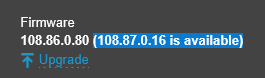
That being said, the Router Phone shows a firmware upgrade available from
1767644793798.png

It does not process. I then did a little digging, tried to push through a manual update through the system. To which I get the "Firmware update failed! Hardware limit" error message. Reviewing the Yealink documentation is slightly confusing as it says it wont support any firmware other than 108.86.0.80. However, it says these are only China and Russia phones? Which we are definitely no located in. Has anyone run into this? Also, is it possible this is causing our issues with the the remote location staying connected via the router phone? I've tried setting up an SBC locally, and it doesn't seem to work at all this way. (we inherited this system).
 
Last edited:
btw.:

This should working.
It should be, but it doesn't I think it's related to the Site-to-Site VPN from some of the research I've been doing, but thats for another day unfortunately. I am also seeing as I dig through here, their previous provider seems to have never taken their local PBX offline. Which I wouldn't image would have an effect, since SIP is pointed to their cloud PBX, but nonetheless, I agree. I am unsure why the local SBC simply won't allow their W70B base to register and function.
 
A know Yealink problem to get from .86. to .87.
https://support.yealink.com/document-detail/3e728045380049d0a7548589f6a6599b

Install the latest .86. firmware (108.86.0.118) first and after that upgrade to 3CX' .87. .

You can deploy this firmware via the 3CX if you enable Admin / Phones / Options / Use Untested - Unsupported Firmwares and upload it there. Don't forget to change it back to Use 3CX Supported Firmwares later.
I will certainly give this a shot and see if it will help!
 
A know Yealink problem to get from .86. to .87.
https://support.yealink.com/document-detail/3e728045380049d0a7548589f6a6599b

Install the latest .86. firmware (108.86.0.118) first and after that upgrade to 3CX' .87. .

You can deploy this firmware via the 3CX if you enable Admin / Phones / Options / Use Untested - Unsupported Firmwares and upload it there. Don't forget to change it back to Use 3CX Supported Firmwares later.
No luck, same Hardware Limit error trying the intermediary update. Also got an internal Server error when attempting to push through 3cx with the Untested option enabled. Looks like they are just V3 hardware.
 
It should be, but it doesn't I think it's related to the Site-to-Site VPN from some of the research I've been doing, but thats for another day unfortunately. I am also seeing as I dig through here, their previous provider seems to have never taken their local PBX offline.
If the S2S connection and Split DNS work through it then no SBC is needed. Otherwise an SBC should be used and at least that one should turn green if the FQDN works from there.
After that, all those other things come into play that you haven’t written about yet. More on that later.

If there is still a local 3CX (before the S2S tunnel), it should be disabled. Otherwise please describe the scenario in more detail.
A lot is possible - almost everything - if it is set up correctly.
 
If the S2S connection and Split DNS work through it then no SBC is needed. Otherwise an SBC should be used and at least that one should turn green if the FQDN works from there.
After that, all those other things come into play that you haven’t written about yet. More on that later.

If there is still a local 3CX (before the S2S tunnel), it should be disabled. Otherwise please describe the scenario in more detail.
A lot is possible - almost everything - if it is set up correctly.
It's hard for me to really describe as I've resolved the issue multiple times, but never by doing the same thing. Long story short, this go around, I removed the 3cx V18 that was installed on a workstation in the environment, that I was not previously aware of. I only noticed when it threw an alert regarding the services stopping without our RMM. It appears when those services stopped, is about the time it came back up, so just waiting out time to see if the line forbidden errors return.

I certainly wish I had more detail to provide, but this was a cobbled together system by the clients former MSP. There are a lot of convoluted aspects of the system, I am trying to unravel and so far most of them seem to only have existed to justify billing this client more money, and most do not seem to serve a real purpose, but that is neither here nor there. I do appreciate all of the input from everyone. I was able to get everything back up and running, just have to wait it out and see what the ultimate result will be.
 
  • Like
Reactions: JohnS_3CX
Hi,

The firmware version we release will always upgrade you from our previous firmware.

Your version is not supported and is lower than our previous stable.

In these cases you need to upgrade the devices step by step, please contact Yealink support and and they can advise you as well as provide the required upgrade versions you need to install before you can reach the final 3CX version.
 
  • Like
Reactions: Evolute IT

Members Online Now

Forum statistics

Threads
111,831
Messages
589,277
Members
164,660
Latest member
RJenkinsROCK