Yealink T46S

Status
Not open for further replies.

Rob Whitney

Forum User
Joined
Feb 14, 2020
Messages
10
Reaction score
2
Not sure if anyone can help me with this. We recently switched from some older Polycom SPIP650 toYealink T46S. Phones are all working as expected except for some reason late at night, and on weekends the phones will immediately just sort of go dark when not in use for about 20 seconds or so. During our regular business hours they work like we have them setup which is the screen saver doesn't come on for about 2 hours of no use. Any thoughts on this?

I found one section in my 3CX Management System under phone settings call 'Auto Switch' and wasn't sure if we need this turned on?

We do have Office Hours set up Digital Receptionist and that all seems to work (and we are open on Saturday's and that works correctly on Saturday, it's just the phones go dark very quickly on that day, and it doesn't go to the screen saver, just a dark screen).
 
This is the default behaviour configured by the template. The phones go power saving between 7pm and 6am if my memory serves.
 
Any idea how to change that - and we also noticed it on Saturday and Sunday all day.
 
Any idea how to change that - and we also noticed it on Saturday and Sunday all day.
You can use a custom template and change the settings.
 
Let me first say that I still have not changed anything with the templates as I do need to research this a little more and don't want to just jump in and screw things up. With that said, I came into the office Saturday morning and again some very strange things going on:

1. All phones are using the standard 3CX wallpaper and not the random one each user had selected that was showing up each day during the work week.
2. All phones lost all the Call Parking buttons that were assigned to each of them.
3. All phones went back to default timeouts on the backlight, wallpaper and screen saver.

They essentially all look how they would have we update the firmware.

When we come in Monday morning it will all be back to normal.

Could the template really be making this happen. We do just have the Standard Yealink T46S template selected for each phone.

Edit: I should add that even after logging into the phones and changing everything to the way it should be, after about 1 to 2 minutes the screen just goes dark until you press a button to wake it back up. So almost does seem like a power saving mode is being enabled on the weekend.

All phones are on Firmware 66.84.0.95
 
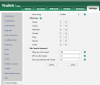
Ok - figured some of my problems out. If I log into the T46 phone itself and go to the settings page there is a section called Office Hours showing each day of the week and the times you want the phone to not go into power saving mode. I saw that it defaulted to always on Saturday and Sunday so just changed all times to reflect our actual office hours.
 
Hi Rob

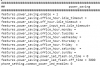
The template enables the power saving mode, but as you see it does not define any hours, so the phone defaults are used. If you change these, the automatic reprovisioning should not affect them

1581935910894.png

1581935867991.png


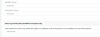
The automatic reprovisioning will affect the background image and the screen timeout however, these are configurable via the management console (Extensions > Phone Provisioning), hence you will see them changing when the phone provisions.
1581936115427.png


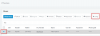
If you wish to see what the PBX sends to the phone, you can click here under "Phones":
1581936218758.png
 
  • Like
Reactions: Evolute IT
Thank you - this is extremely helpful!!

If I wanted to change that config file for each phone, could you let me know how I would set up the following to do 8am to 5pm (for example):

Currently says:

features.power_saving.office_hour.monday =

Would I change it to?:

features.power_saving.office_hour.monday = 08--17

(or are you saying since I changed it by accessing the phone I should be OK at this point)
 
I was saying the 2nd thing: you should be OK since you changed it on the phone. Our provisioning will not affect it. You can avoid the need for custom templates this way.
 
  • Like
Reactions: Evolute IT
Thank you - Appreciate the help with this alot!
 
  • Like
Reactions: JohnS_3CX
Status
Not open for further replies.

Latest Posts

Forum statistics

Threads
111,937
Messages
589,831
Members
164,819
Latest member
mechelle