Solved Yealink t46U remote phone not fully provisioning

Status
Not open for further replies.

dwasniak

Silver Partner
Basic Certified
Joined
Apr 10, 2012
Messages
26
Reaction score
6
Using Version 20 release 7. I created a new extension and added a new T46U phone as a remote router phone. Booted up the phone offsite and it received the provision file on the phone, changed the password, setup the BLF's but shows No Service. The event log shows it sent the provision file successfully but nothing after that. I updated the firmware on the phone before adding it. The firewall checker was successful, and the IP address is not being blocked. I have deleted the phone from the user and re-created then factory reset the phone with the same result. Any other suggestions.
 
Hello @dwasniak ,

You may have tested one, some or all of these thing, but just want to mention them as being inportant:

1) Time: NTP client running on 3CX server, meaning time is set correct in the OS ? Including timezone, summertime settings.
2) Certificate of 3CX FQDN, do you use own of 3CX provided ?
3) Does the 3CX server also have an IPv6 address? Does the offsite have an internet connection with IPv6 ?
4) Port 5090 TCP (if not changed), the firewall does test UDP not TCP, please check firewall at 3CX server side for TCP on open port *5090.

Let us know, if any of this did help or presented you with some idear on how to fix it.

Paulo
 
Thank you for your response. Please see below.

1. The time, time zone and set for daylight savings change on the 3CX windows computer is correct
2. 3CX provide FQDN
3. Both sides have ipv6 enabled
4. Both UDP and TCP objects in the firewall are open
 
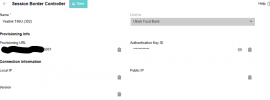
Screenshot 2025-10-14 125654.png
I am assuming the connection Information should have values.
 
Hello dwasniak,

The Local IP, Public IP and Version will be available when the SBC / Routerphone does connect.
No values means, there has never been a connection yet... not just now, but never yet.

Paulo
 
Did you put 3CX firmware on the phone before provisioning?
 
  • Like
Reactions: fxbastler
Hello @dwasniak ,

You wrote the 3CX is on a Windows machine?
If yes, than you have 2 firewalls:
-WIndows OS firewall
-Network/internet firewall
Both okay?

Did you try to use a smartphone with the 3CX APP on this 3CX server, does that work?

Paulo
 
Yes. Firmware was download from yealink and installedbefore anything else.
 
local firewall is off. All local yealink phones work. The App also works off network. I tried another new yealink phone t54w and it does the same thing.
 
  • Like
Reactions: paulodagraca
  • Like
Reactions: RoryJ
  • Like
Reactions: RoryJ
3. Both sides have ipv6 enabled
No IPv6, you need IPv4 for router phones to work correctly.

Yes. Firmware was download from yealink and installedbefore anything else.

The firmware must specifically be the one we provide here: https://www.3cx.com/docs/phone-firmwares/

When you are done upgrading, factory reset the phone again. Do not skip this step.


If you still have trouble, please follow our guide and do everything here from the beginning:
https://www.3cx.com/sip-phones/yealink-t4-series/
 
No IPv6, you need IPv4 for router phones to work correctly.


The firmware must specifically be the one we provide here: https://www.3cx.com/docs/phone-firmwares/

When you are done upgrading, factory reset the phone again. Do not skip this step.


If you still have trouble, please follow our guide and do everything here from the beginning:
https://www.3cx.com/sip-phones/yealink-t4-series/
Go to know, don't download the firmware from the Yealink site. The firmware from the 3CX download worked for the T46U. It had the .15 firmware and the 3CX site had the .16 firmware download. I deleted the phone from 3CX, upgraded to the firmware from the 3CX site and factory reset. Add back to 3CX and viola!
 
Status
Not open for further replies.

Members Online Now

No members online now.

Forum statistics

Threads
111,831
Messages
589,277
Members
164,660
Latest member
RJenkinsROCK