Yealink T48G Trusted Certs

Status
Not open for further replies.

gigaboy

SOHO User
Joined
Jul 6, 2016
Messages
90
Reaction score
3
I'm not getting an answer from Yealink, so maybe someone on this forum can help.

I continue to have problems with one of our T48G devices, using 3CX.
Have done several hard reboots, using latest firmware.

1) Before provisioning with 3cx, I can get in to the device with browser and admin username/password. First thing I do is disable Trusted Certs, because other devices worked when I disabled this (wondering if this is related to the Symantec CA Cert non-trust issue).

2) Then I reboot again, and 3cx shows new device. Assign an extension to the device, and then click provision.

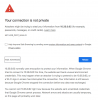
3) Device reboots, but when I click on Phone UI button in 3cx, I get the message in the screenshot, attached, when I use FF. Opening up Chrome and going to the IP of the phone, without https gets me to a log in screen, but username/password won't work, either default or what is shown in 3cx. Then it locks me out.

4) Wondering if the device is defective? Can the firmware be reinstalled, and if so, how?

Thanks, I really frustrated with this!
confused.gif
 
Hello @gigaboy

Getting a security warning when trying to access a phones local IP with HTTPS is normal. You can add an exception in firefox and skip the error in chrome.
What credentials are you using to login to the phone?
 
Can't add exception in FF (options/security/exceptions - no way to do it), can't be bypassed in Chrome. Tried this three additional times. All times resetting to factory the device, and then before provisioning logging into phone using ip address and default uid/pwd, trying both enabling and disabling Trusted Certs on the phone. Then provision, once done, clicking on phone UI button inside 3cx for corresponding phone. Immediate redirects to https://192.168..... and throws the secure connection failed. Can;t even get to login screen. I don't have this problem with another t48g, did the same process outlined and was able to get to the login screen correctly.
 
Instead of clicking the phone UI button have you tried just putting the URL in the browser? And yes you absolutely can bypass the security warnings in both Chrome and Firefox:

In Chrome after clicking Advanced:

upload_2018-11-29_17-25-35.png

And Firefox after clicking Advanced:

upload_2018-11-29_17-26-16.png

Don't need to do anything about trusted certs. That setting is for the phone to trust/not trust certs when acting as a client.
 
1) Cleared Cache on both browsers and rebooted the windows machine.
2) Went into my router and deleted the dhcp lease, so the phone can pick up a new one.
3) Factory reset the phone, then attached the extension to the phone.
4) I can make and receive calls to the device.
5) However, still cannot get into the web browser to fine tune the configuration. Same error message, even when entering in the non-https url directly into the browser.
6) Firefox does not give me an option to "Add Exception" either from the browser nor from the options/certificates menu.
7) Chrome, allows me to place an exception, but then the popup window won't take any credentials that I enter.

Wondering if the firmware can be reinstalled on this device, I suspect corruption. I haven't had this issue with other T48G devices.
 
Yeah it sounds really goofy. Have you tried just updating the firmware manually? Otherwise if it's less than a year old I'd reach out to whoever you bought it from to see about starting a RMA.
 
Firmware update failed!
ROM version same

Can I use a previous version of rom, then re-upgrade to present version?
Just attempted a previous version, but look at the file path, I downloaded a prev version and placed it in the root of my local D:drive - could malware be in the phone?

2018-11-30_3-56-51.jpg
 
Last edited:
That is how Yealink phones present the path when manually upgrading the firmware so that is not an issue. With the current firmware you are running i believe you cannot downgrade the firmware.
 
I had (and still have) problems to provision my T46s devices from the 3cx.
The only (bad) workaround I found, was to extract the cert of my 3cx hosted provider and import it over the webclient directly to each device and disable Trusted cert under security.
It seems, as the issue ist related to the cert of my provider. I have sent him a support case 6 weeks ago and... yes... not have a feedback yet ("the case is under investigation..." -> since 6 weeks;-).
Since today, I am not able to access the 3cx console (hosted by the same provider) with FireFox and and also not from Chrome (whereby Edge still works)
=> Insecure, not trusted site.

The reason is, that ForeFox and Google Chrome no longer trust Symantec certs (note: Globalsign, RapidSSL and also Thawte are part of the "Symantec universe").
Link to a German posting to the theme:
https://www.cyon.ch/blog/Aus-die-Maus-fuer-SSL-Zertifikate-von-Symantec

I don't know, how exactly the "cert checks" works in the background between the Yealink devices and the 3cx, but assume, that my problem has something to do with the "un trust" of the symantec certs.
 
I have also been unable to access the phone UI with Chrome for our Yealink T46G phones since a few 3CX updates ago. Chrome throws an exception ("Your connection is not private"), but then there is no option under Advanced to go to the page anyway (there is a complaint about "scrambled credentials"). Even if I try an insecure (http) connection, it just redirects to the secure/https page again.

Safari on the Mac doesn't work either; I just get stuck in a loop trying to add an exception.

The only way I can get to the phone UI is to use Firefox & add an exception. THAT works, but is incredibly aggravating as I have to open up yet another browser just for this. It's ridiculous.

Tim King
 

Attachments

  • 3CX Phone UI Failure in Chrome.png
    3CX Phone UI Failure in Chrome.png
    120 KB · Views: 4
Quick update. I reset the phone to factory since I was having problems getting it to reprovision/register with updated authentication (because of new 15.5SP6 warnings), and miraculously, Chrome was able to open the phone UI without even a warning (because it is connecting via http & not getting redirected to https).

Of course, it won't provision to the correct extension, but that's a separate issue.

Tim King
 
Status
Not open for further replies.

Latest Posts

Forum statistics

Threads
111,901
Messages
589,638
Members
164,768
Latest member
Eagle Man