


- Joined
- Mar 4, 2020
- Messages
- 3
- Reaction score
- 0
Having an Issue with Yealink T48S getting stuck on registering when trying to auto provision.( Using STUN)
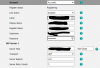
I manually enter in the provisioning URL and it will get majority of the settings such as contact Speed dial keys, but not register the account it seems to get stuck and does not fail it continuously says "registering". If i do not put this URL in it will not pull down any configuration.
Phones have been factory reset, updated and still not working. Have registered with the same accounts on a yealink T53 which worked. Have also tried to provision the phones on another working 3CX instance and this did not work either.
i can manually put the account details in and this will allow the account to work but it does not give them access to the contact and preconfigured keys.
Any ideas would be helpful. I am leaning towards a phone issue and have raised a ticket with Yealink, any ideas on some items to check would be appreciated.
Cheers,
I manually enter in the provisioning URL and it will get majority of the settings such as contact Speed dial keys, but not register the account it seems to get stuck and does not fail it continuously says "registering". If i do not put this URL in it will not pull down any configuration.
Phones have been factory reset, updated and still not working. Have registered with the same accounts on a yealink T53 which worked. Have also tried to provision the phones on another working 3CX instance and this did not work either.
i can manually put the account details in and this will allow the account to work but it does not give them access to the contact and preconfigured keys.
Any ideas would be helpful. I am leaning towards a phone issue and have raised a ticket with Yealink, any ideas on some items to check would be appreciated.
Cheers,
Last edited:


