Yealink T48U do not transfer

Status
Not open for further replies.

decibell

Customer
Joined
Jan 8, 2019
Messages
8
Reaction score
0
Hello Everyone,

I have a small problem with transfer using Yealink t48U
I have 12 Phones Yealink 43U working good

When i set the T48U (exp ext201) to transfer >>Menu>>alway transfer on to another ext. (exp Ext200)
the phone (201) display the transfer is on, when someone call the ext 201 it suppose to transfer to ext 200
it is not the ext 201 ring normaly and then goes to VM

Allow multiple call is enable
Latest version of 3CX 18.0 (Build 965) and Phone template frw 108.86.0.72
the phones are auto provisionned by stun

Any help please!

Thanks
Joe
 
Hi Joe,

If you are setting up call forwards through the T48U menus, please be advised that we do not support that.

The only supported way of forwarding calls is via 3CX statuses, so whatever you put in the actual phone menu will not work the way you expected.

when someone call the ext 201 it suppose to transfer to ext 200
it is not the ext 201 ring normaly and then goes to VM
You probably have this setup under 3CX >> Your extension >> Forwarding Rules and this is why it is happening.
 
  • Like
Reactions: Evolute IT
Hello John,
Thanks for your reply,
I'm not sure i understand what do you mean!
the forward i'm doing is a classic forward, on all phones works except the T48U!!!
from the Phone >>Menu>>Features>>call forward

So you mean every time i need to forward the ext. i need to log to 3cx webclient and do the forward from there???

under 3CX >> Your extension >> Forwarding Rules the setup is if no answer or not registered go to VM (default settings)

thanks
Joe
 
So you mean every time i need to forward the ext. i need to log to 3cx webclient and do the forward from there???

Hi Joe - Yes, I'm saying exactly this. 3CX does not support performing call forwards from the phones.

You can still do it if you want of course, but since this is not a supported mode of performing forwards, we cannot help you in case it causes undesired behavior.
 
  • Like
Reactions: Evolute IT
Hi John,
But this is not fun, every time the client want to forward the call, he need to log in to webclient do the forward, and then login again to cancel the forward!!!
Thanks
 
I understand, but currently this is the mode that 3CX offers I'm afraid.


If I can make a suggestion, in case this might be helpful:

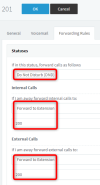
1. Edit the extension 201 and select to edit the DND status
2. Send all calls to 200 for the DND status
1658406062479.png

Now whenever the user of 201 presses the DND button on the T48U screen, the 3CX status of "DND" will become active and the calls will go to 200 like you wanted.

3. When they press DND again, they will return to the "Available" status and the forwards will go away.

I hope this helps!
 
  • Like
Reactions: Evolute IT
Hi,
Yes this is a helpful idea, but in this case the customer loose the real DND function.
and it's not always the forward is for the same ext. then every time they have to login and change the ext.#..!!!
Sorry but it's not fun...
Thanks for your help.
 
I understand Joe. One final suggestion if I may so you don't lose the real DND at least:

3CX has two spare additional statuses Custom 1 and Custom 2 (labeled "Lunch" and "Business Trip")
You can actually use "Business Trip" which acts exactly like a spare DND.
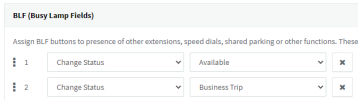
These can be assigned on the phone so you can switch back to Available.
1658409721884.png


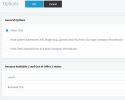
Just FYI, the custom statuses can also be renamed too, under PBX settings >> options
1658410074806.png
 
  • Like
Reactions: Evolute IT
Status
Not open for further replies.

Members Online Now

Forum statistics

Threads
111,832
Messages
589,284
Members
164,662
Latest member
DejanMDS