Yealink T4X/T5X Provisioning Not Working

pmterp

Gold Partner
Advanced Certified
Joined
Jun 13, 2017
Messages
420
Reaction score
249
We're adding new phones to 3CX as we always have but when we connect the phones, they're not automatically pulling their config files.
My understand was, when we add a Yealink phone to a 3CX instance, DO NOT check the "I'll configure myself" button, and select the Connect Directly option, the config file was generated and an entry was sent to YMCS. Then, when the phone was connected with factory settings, it would use PNP to check YMCS for an entry, grab the provisioning URL, and then pull the config file.

Has anyone else experienced issues with this or am I misunderstanding the process?
 
Connect Directly will set it up as a router phone, needed if you don't have an SBC, and the server is elsewhere.

If you don't have the latest, or at least, recent enough, firmware on the phones the attempt can fail and will likely/eventually blacklist your IP.
 
Thanks @SteveITS. Yes, this is in reference to phones going to remote locations (hosted PBXs / not 3CX hosted) to be used as router phones.
I'm also having our distributor update the firmware before shipping, currently a T53W is running 96.87.0.16. The PBX does not currently have any IPs on the blacklist.

I THINK this started when we went to this newest firmware but I can't say for sure.

Also, if I log into the phone's web gui and add the provisoning URL, that works so I know the config files are being generated. It seems like either with the new firmware, the phones are not checking YMCS or 3CX isn't getting the entry to YMCS.
 
Some simple tests you can run

1. If you have access to RPS, try to add the phone and see if it errors about already being added. This will confirm if RPS has the 3CX entry or not.
2. Check the log from the phone itself. Maybe networking didn't come up in full before the phone finished booting or something else.
3. Make sure the SSL cert on the PBX contains the full chain (if using custom SSL certs) - although this isn't likely.
 
Thanks @SweetAction . I added the same phone to RPS (which I don't use frequently) and it is showing "Pending". I'm not sure I remember seeing that before. But I did not get an error that the device already existed on another account (which I have seen before).
I also checked the 3CX Event Log and there's not a line about not being able to add it to RPS.
 
Over here scratching my head.
I pulled out a T54W with the current 3CX firmware, added it to the PBX and the phone provisioned without issue. For giggles, I tried to add the MAC to RPS and got the error that it was already added to an account.
So the T54W made it from 3CX to RPS but the T53W didn't.

The T53W has a different MAC prefix from what I've seen in the past, 44DBD2. I wonder if that could be a factor.

Never mind that ^
The message was the device was already added to MY COMPANY because I had experimented with the T54W on RPS before.
 
Last edited:
I also checked the 3CX Event Log and there's not a line about not being able to add it to RPS.
There's your problem right there, lets check the basics:

1. Ensure that this is actually turned on
1745479651994.png

2. Ensure you are using our default template, not a custom one where RPS can be turned on/off


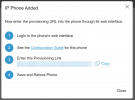
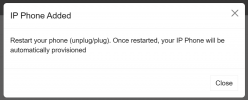
And here is a little tip: The dead giveaway if the RPS option is turned off on 3CX or in the template, is that you will see this at the end of the add phone wizard.
1745479870513.png

Otherwise you would see this instead, since we do not show you the link if RPS is enabled
1745479973889.png
 
Hey @JohnS_3CX thanks for the response.
1. Yes, "Allow 3CX to provision".... is enabled.
The second box, "Secure device provisioning..." is not checked.
2. This is a fresh install, no custom templates.
This was reported a few times recently from different clients who have received Yealink phones, so it isn't specific to a single location/network/IP address or 3CX instance.
It was reported to me (but I cannot confirm yet) that after this happened the other day, the support agent manually entered the provisioning URL and the phone programmed successfully. Then, they had the customer perform a factory reset to move the phone to another extension. The agent moved the phone to the other extension in 3CX and when the phone booted again, it automatically provisioned.

If no one else is experiencing the issue using PNP on new Yealinks running the current firmware, I'm assuming it has something to do with our setup.

I've ordered a new Yealink phone so that I can experiment and get better data and will report back with my findings. I'm certainly open to any other suggestions or ideas in the meantime.
 
Hi,

This was reported a few times recently from different clients who have received Yealink phones, so it isn't specific to a single location/network/IP address or 3CX instance.
But we do need a specific case to look at. Reports are not as useful as logs when it comes to that stuff ;)

Also the new phone test is not as important here. What is most important is to look at the Event Log to see that the RPS entry was delivered in each individual case that was reported to you by the customer. If you don't see it yet, check back within a minute or two in case there is an issue and the reply appears after the timeout.

Important: do not delete the phone, and do not add the MAC to another PBX, let me know what you saw in the log instead. After we establish what the event log says, we can take it from there.
 
Thanks @JohnS_3CX. I can confirm that when I add a MAC to the 3CX instance, the event log IS showing that the RPS request was delivered successfully.
As mentioned, this isn't an isolated case with a single phone or PBX. After multiple reports of user's new phones not auto-provisioning, I started the investigation process.
Here's the order of events for clarity:
  1. The phone was unboxed, connected to the network, and the firmware was updated to the current 3CX supported version.
  2. Then the phone was added to the 3CX instance as a router phone.
  3. The event log shows "RPS request for Yealink (MAC:XXXXXXXXXX) IP Phone of Synfone Support delivered successfully"
  4. The phone (screen and web UI) were prompting to set an admin password (which we did not do, just left it sitting there).
  5. We rebooted the phone and it just continues to show the prompt to set a password (it did NOT provision).
After a couple of reboots, confirming the device was on the network (because we could access the web UI), we set a temporary admin password to log in, added the phone's provisioning URL via the web UI, and hit "Auto Provision Now". The phone provisioned as expected.

After it was working, we identified the phone needed to be added to a different extension. We deleted the phone from the original extension, added it to the correct one, did a factory reset (by holding the OK button), and the phone rebooted and pulled the new config file and provisioned without issue.

So at least in this case, it appears that it wasn't getting directions from Yealink RPS until it had been programmed the first time. I thought to check if PNP was enabled on the phone (via the web UI) and it was. I now have some more phone on their way and will be able to see if I can recreate the same problem.
 
Hi,

If it worked after the reset then it seems to be working ok as expected. Not too sure if it should pull the config after the reboot, but not clear what happened there unless it already pulled something from Yealink and decided to stop.

Keep an eye on the next one and we will see accordingly, always remember to check the Event log to be sure.
 
@JohnS_3CX I received a new T53W today.
I've opened the box, connected it to my local network, logged in with admin:admin, and can see the phone shipped with firmware 96.86.0.75.
I went to https://www.3cx.com/docs/phone-firmwares/ and downloaded T5XW-96.87.0.16.rom for the T53W.
When I attempt to upgrade the firmware via the phone's web UI, I get an error "ROM Invalid - Rebooting".
I deleted the file and redownloaded and attempted again with the same result.

I'm now wondering if the FW file linked on the website is corrupt. Now that the issue is reproducible (for me at least) let me know if you can assist or if I should open a ticket.
 
  • Wow
Reactions: pmterp
@SteveITS thank you very much, I had not seen that.
I'll experiment in a minute but do you know if 3CX still allow the T5X to join the server as a router phone if running .81?
 
Don't know, haven't tried the newer firmwares yet. If you have the ability to edit the blacklist on this server, or better yet allow the phone's IP, I'd just try it. My guess would be that .77 (? start of router phone firmware, didn't look) and later would be OK.

Another option I've done in the past is to connect a phone through an SBC or other router phone then update it, then delete and reconfigure as a router phone.
 
Okay, I upgraded the phone to 96.86.0.81 and then added it to the 3CX PBX. It did provision and connected as a router phone (without another router phone or SBC on the network).
Then I was able to trigger the update to 96.87.0.16 from 3CX.
Thanks for your help.
 
  • Like
Reactions: SteveITS

Members Online Now

Forum statistics

Threads
111,832
Messages
589,282
Members
164,662
Latest member
DejanMDS