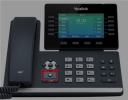
Yealink T5 Series | Configuration Guide

KaterinaK_3CX

Joined
Feb 24, 2016
Messages
246
Reaction score
36
Supported models:
  • Yealink T52S
  • Yealink T53 / T53C / T53W
  • Yealink T54S / T54W
  • Yealink T56A
  • Yealink T57W
  • Yealink T58A / T58W
Read the guide.
 
Hi,
I upgraded to 18.0 (Build 889) Alpha 6 thinking I would see these 'router' or 'normal' phone options, but they are not there.
What am I missing?

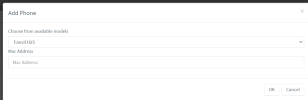
1671487348053.png
 
Hi @Zacman,

To configure the router phone, you will have to login to the Web Client with an extension with System Administration right enable(User >> Rights section at the bottom) and at least "Group Administrator" role configured.

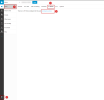
Then go to Web Client >> Admin >> Users >> Select a user >> IP phone section >> Configure a phone >> Select Outside of Office and you will have the option to configure a router phone.

The rest of the steps can be found here: https://www.3cx.com/sip-phones/yealink-t5-series/#:~:text=Select "Router Phone".

1671488219674.png
 
  • Like
Reactions: JohnS_3CX
Thank you. I never was able to find the admin portion in the webclient as I didn't have the roles configured, now it all works. Will give it a shot and see how the router phones work.

Maybe I didn't need to upgrade to Alpha 6, but seems to be working so will test it for all.
 
Update - This worked, I was able to add the router phone and get it working.

I notice the template uses UDP for SIP and no SRTP. Even on a local LAN it is desired to have this traffic encrypted. When I looked at editing the template for this it seems adding the router phone is only available from the webclient, and the webclient doesn't detect custom provisioning templates? Please consider adding this ability in the normal admin center, or at least have the webclient support the custom templates, add encryption options in the phone provisioning UI, or just enabling encryption (SRTP at the least) since no real reason not to.

Thanks.
 
  • Like
Reactions: Evolute IT
I have the following questions and issues in our environment with the Yealink T57W. We have a 3CX system and the phones are running 96.86.0.74 firmware. Here are the issues we are having and what we have attempted to resolve them.


  1. We have users that report the phone auto answering calls, despite Auto Answer being set to Off for each line in the phone UI. We have also tried to upload the following lines to a cfg file and upload that directly to the phone. account.1.auto_answer = 0, account.2.auto_answer = 0. I should also add that we are using the EHS 40 with a Plantronics Savi W740 headset. It seems that changing this setting in the UI has no effect on the phone and does not pass the setting to the phone despite it saying it is saving to the phone. I have not been able to confirm if adding them to the cfg file and uploading to the phone has any effect on not auto answering the calls. Do you have any idea why the phones would auto answer despite the settings saying otherwise?
  2. The Forwarding feature on each phone seems to have zero effect on actually forwarding calls to another phone. We have turned the setting on in the phone UI with no effect. We have also tried setting the Always forward feature on the phone itself with no effect. We have also the following lines added to a cfg file with no effect. features.fwd.allow = 1 None of these things enable the actual forward feature and calls still ring through to the ext even when it displays that forwarding is enabled on the home screen of the phone. This is a must have as our sales folks constantly need to forward to other employees when they are on break or leaving early for the day. Please let me know asap if this even an option on this phone or if the setting is just arbitrary and has no actual effect on the phone.
  3. We have also tried to set DND in a similar manner to the forwarding setting, as changing these settings in the UI and then confirming them seem to have zero effect changing anything on the phone. We've tested the following lines in a cfg file with mixed results. features.dnd.allow = 1. Adding this setting to a cfg file and uploading to the phone only seems to show that DND is enabled on the home screen but calls still come through to the main line and it seems to remove the user from the queue in 3CX.
  4. I have another ticket open with Rowan, ID #258952 regarding suppressing the call display when end users are in the menu. He sent me the cfg line phone_setting.incoming_call_when_dialing.priority = 3 but when using this setting it seems to suppress all calls for a set duration somewhere around 2 to 3 minutes. During this time, no calls will come through to the phone. Is the number on the end of that line a parameter for how long this setting lasts? The issue is that they cannot do anything on the phone when there are calls coming in to either line. So Rowan sent that line to hopefully fix that but I feel as though the duration of that parameter is too long for our purposes. Can you advise on what we can do or if that value of 3 can be changed to shorten the duration?
 
I have the following questions and issues in our environment with the Yealink T57W. We have a 3CX system and the phones are running 96.86.0.74 firmware. Here are the issues we are having and what we have attempted to resolve them.


  1. We have users that report the phone auto answering calls, despite Auto Answer being set to Off for each line in the phone UI. We have also tried to upload the following lines to a cfg file and upload that directly to the phone. account.1.auto_answer = 0, account.2.auto_answer = 0. I should also add that we are using the EHS 40 with a Plantronics Savi W740 headset. It seems that changing this setting in the UI has no effect on the phone and does not pass the setting to the phone despite it saying it is saving to the phone. I have not been able to confirm if adding them to the cfg file and uploading to the phone has any effect on not auto answering the calls. Do you have any idea why the phones would auto answer despite the settings saying otherwise?
  2. The Forwarding feature on each phone seems to have zero effect on actually forwarding calls to another phone. We have turned the setting on in the phone UI with no effect. We have also tried setting the Always forward feature on the phone itself with no effect. We have also the following lines added to a cfg file with no effect. features.fwd.allow = 1 None of these things enable the actual forward feature and calls still ring through to the ext even when it displays that forwarding is enabled on the home screen of the phone. This is a must have as our sales folks constantly need to forward to other employees when they are on break or leaving early for the day. Please let me know asap if this even an option on this phone or if the setting is just arbitrary and has no actual effect on the phone.
  3. We have also tried to set DND in a similar manner to the forwarding setting, as changing these settings in the UI and then confirming them seem to have zero effect changing anything on the phone. We've tested the following lines in a cfg file with mixed results. features.dnd.allow = 1. Adding this setting to a cfg file and uploading to the phone only seems to show that DND is enabled on the home screen but calls still come through to the main line and it seems to remove the user from the queue in 3CX.
  4. I have another ticket open with Rowan, ID #258952 regarding suppressing the call display when end users are in the menu. He sent me the cfg line phone_setting.incoming_call_when_dialing.priority = 3 but when using this setting it seems to suppress all calls for a set duration somewhere around 2 to 3 minutes. During this time, no calls will come through to the phone. Is the number on the end of that line a parameter for how long this setting lasts? The issue is that they cannot do anything on the phone when there are calls coming in to either line. So Rowan sent that line to hopefully fix that but I feel as though the duration of that parameter is too long for our purposes. Can you advise on what we can do or if that value of 3 can be changed to shorten the duration?
Probably best if you start a new thread under the IP Phones \ Yealink category
 
Hello there,

I cannot find the required Firmware-Version anywhere in the article - I read "Note: If you are planning to install a router phone, read the section below regarding the firmware requirements.", but then I cannot find the required Firmware-Version anywhere? Is this by design? I have found with the forum that the Version 96.86.0.74 is working (which I can confirm, just tested that), but nontheless I think this should be mentioned in the article...
 
Hello there,

I cannot find the required Firmware-Version anywhere in the article - I read "Note: If you are planning to install a router phone, read the section below regarding the firmware requirements.", but then I cannot find the required Firmware-Version anywhere? Is this by design? I have found with the forum that the Version 96.86.0.74 is working (which I can confirm, just tested that), but nontheless I think this should be mentioned in the article...

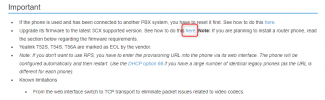
In the important section, you can find the link to go to the firmware upgrade procedure page. This is just before the note you mentioned.

1708692113274.png

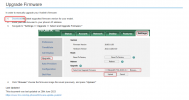
Then, on the page you are redirected you can find the page with all the supported firmware

1708692183739.png
 
Thank you very much for clearing that up!
 
We have an installation still on V18.....Have a new T58W with camera....I see it is listed on the approved phone list, yet it is not available on the add phone page in ADMIN. Do I need to download an updated profile? If so, from where?

Thanks,
 
T58W is a choice in v18 for me. I was looking in the legacy management console though just now.
 
We have an installation still on V18.....Have a new T58W with camera....I see it is listed on the approved phone list, yet it is not available on the add phone page in ADMIN. Do I need to download an updated profile? If so, from where?

Thanks,
Since you are on V18, you probably selected "Outside the Office > Router phone" which was is indeed not an option at the time.

The T58W gained router functionality in V20, with a later firmware release. You will have to upgrade to V20 if you want to use this as a router phone to connect directly to 3CX.
 
3CX, We are seeing 96.86.0.81 for most of the Yealink T5x phones. Do you have release notes for what's changed from 96.86.0.77?
 
Updated the firmware on some T54W's to 96.87.0.16 recently and having done so the "End Call" soft key has annoyingly moved itself to a page 2. We can reconfigure manually but surely this should be "front and center" in all cases when there is an active call? Is this a Yealink firmware issue or a 3CX auto-provisioning issue?
 
Updated the firmware on some T54W's to 96.87.0.16 recently and having done so the "End Call" soft key has annoyingly moved itself to a page 2. We can reconfigure manually but surely this should be "front and center" in all cases when there is an active call? Is this a Yealink firmware issue or a 3CX auto-provisioning issue?
Hi,

This was a Yealink decision, we don't have any provisioning options to change this unfortunately.

I realize it can be a bit annoying, but also note that these phones have a dedicated "X" button to end the call. Takes some getting used to at first, but it is quite handy to be fair.

1753785883846.png
 
  • Like
Reactions: KyriacosS_3CX
Hi,

This was a Yealink decision, we don't have any provisioning options to change this unfortunately.

I realize it can be a bit annoying, but also note that these phones have a dedicated "X" button to end the call. Takes some getting used to at first, but it is quite handy to be fair.

View attachment 48793
Yes I am aware of the X button and if you are on speakerphone you can also end the call by tapping the speakerphone button.

However our customers may (will) find this update rather confusing and a bit of a retrogade step. If you have a chance to influence Yealink's decision I think the "End Call" would be better re-located back to where it was before i.e. on Page 1
 

Members Online Now

Forum statistics

Threads
111,831
Messages
589,277
Members
164,660
Latest member
RJenkinsROCK