Yealink T58 Phantom outbound call

TSSEngineers

Customer
Advanced Certified
Joined
May 10, 2024
Messages
16
Reaction score
0
Hello all,

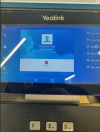
I was hoping to get some assistance. We recently upgraded to Version 20, and since then one of the phones on our System is showing that it is making an outbound call, without making one. Click cancel, and within half an hour it starts occurring again. We have rebooted and reprovisioned the phone a few times, and it still occurs. Other phones are fine. This number isn't currently present on this users profile, it was removed but it still keeps showing.

Was wondering if anyone had seen this on a 3cx/Yealink before.

Kind Regards,
Joe
 

Attachments

  • Yealink issue.png
    Yealink issue.png
    548.6 KB · Views: 15
Hello TSSEngineers,

You need to do 3 (or 4) things:

1) Factory reset the phone (keep OK button pressed for 10 sec.).
2) Login to the 3CX Admin - Users - Select the account and Click the "Reset Password"
3) Provisioning the phone again... wait 1 hour.

The phone should work normal again, if not: than you need to do the last part
4) Buy a new phone, something is really not good. :oops:

Paulo
 
My first guess is that you have a hacked password. The first thing you should do is reset your phone and extension passwords immediately. Always good to be on the latest supported 3CX phone firmware too.
 
And check if some web/pwa etc is set to use the phone to make calls, as then the call would be originating from another device and then showing on the phone:
1758865939434.png
 
  • Like
Reactions: paulodagraca
Thanks all,

How easy is it to re register these specific Yealinks if we go down the factory resetting route, can it all be done from the Web page as the user at the far end isn't the most tech savy person.

We have reprovisioned a few times, the strange thing is it doesn't show up in the call log on 3cx whatsoever so just looks related to the phone.

Kind Regards,
TSS
 
Hi,

If the firmware on the phone is the one provided by 3CX, it should not be any great issue. Make sure you do remove all mentions of it from the PBX, so it comes in as brand new. Extension assignment, phones tab.

Is it coming in via an SBC?
 
Hello TSSEngineers,

Just as extra reminder, it is NOT just the factory reset of the phone.
That wil remove any "wrong" configuration parts from the phone.

The part where you MUST reset the configuration on the 3CX, will change all the passwords,and get you safe again!
In this case all of the phone settings and configuration pasrt are 'new' and 'safe' again.

Lets us know if it all works out for you.

Paulo
 

Members Online Now

Forum statistics

Threads
111,831
Messages
589,277
Members
164,660
Latest member
RJenkinsROCK