


- Joined
- May 16, 2019
- Messages
- 93
- Reaction score
- 46
In the Yealink T4x template the current value is hardcoded to Ring2
distinctive_ring_tones.alert_info.2.ringer = Resource:Ring2.wav
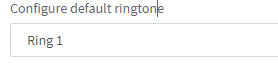
In the UI it shows you can pick a ringtone but the setting is ignored due to this hardcoded value
The template should likely be changed to this:
distinctive_ring_tones.alert_info.2.ringer = Resource:%%defringtone%%
It solves the problem and now the selected ringtone setting in the UI is now honoured. So you can set different ringtones when there are phones close to each other in shared office areas.
Another quality of life improvement would be to allow configuring the headset as a ring device so someone with a DECT headset plugged in gets audible tone in their ear when away from the desk.
#Specify the ring device when the phone is in the Headset mode; 0-use Speaker (default), 1-use Headset; 2-use both
features.ringer_device.is_use_headset = 2
Another quality of life improvement would be to allow selecting if multicast paging is for emergency use or not and configure the device to not override an active call during pages
#Enable or disable the phone to handle the incoming multicast paging calls when there is a multicast paging call on the phone; 0-Disabled, 1-Enabled (default);
#If enabled, the phone will answer the incoming multicast paging call with a higher priority and ignore that with a lower priority.
multicast.receive_priority.enable = 0
#Configure the priority of multicast paging calls. It ranges from 0 to 10.
multicast.receive_priority.priority = 0
distinctive_ring_tones.alert_info.2.ringer = Resource:Ring2.wav
In the UI it shows you can pick a ringtone but the setting is ignored due to this hardcoded value
The template should likely be changed to this:
distinctive_ring_tones.alert_info.2.ringer = Resource:%%defringtone%%
It solves the problem and now the selected ringtone setting in the UI is now honoured. So you can set different ringtones when there are phones close to each other in shared office areas.
Another quality of life improvement would be to allow configuring the headset as a ring device so someone with a DECT headset plugged in gets audible tone in their ear when away from the desk.
#Specify the ring device when the phone is in the Headset mode; 0-use Speaker (default), 1-use Headset; 2-use both
features.ringer_device.is_use_headset = 2
Another quality of life improvement would be to allow selecting if multicast paging is for emergency use or not and configure the device to not override an active call during pages
#Enable or disable the phone to handle the incoming multicast paging calls when there is a multicast paging call on the phone; 0-Disabled, 1-Enabled (default);
#If enabled, the phone will answer the incoming multicast paging call with a higher priority and ignore that with a lower priority.
multicast.receive_priority.enable = 0
#Configure the priority of multicast paging calls. It ranges from 0 to 10.
multicast.receive_priority.priority = 0


