- Joined
- Apr 11, 2023
- Messages
- 7
- Reaction score
- 1
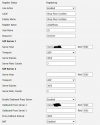
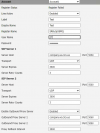
Was hoping someone could shed some light on this. I'm stuck, and I really could use someone to show me the light and add to my troubleshooting tree.
First time forum poster, long time reader.
Moved company to a new server and rebuilt it from scratch. Everything worked well for the most part except for the W52P.
Previous Firmware was 25.81.0.60, I then downgraded to Firmware Version 25.81.0.30. Massive factory resets, and starting over trying to catch some kind of mistake on inputs.
There was a custom xml for the 52 that was in version 16 that I tried as well. I've whitelisted the IP and nothing shows in the event logs.
Appreciate any insight. Much appreciated.
First time forum poster, long time reader.
Moved company to a new server and rebuilt it from scratch. Everything worked well for the most part except for the W52P.
Previous Firmware was 25.81.0.60, I then downgraded to Firmware Version 25.81.0.30. Massive factory resets, and starting over trying to catch some kind of mistake on inputs.
There was a custom xml for the 52 that was in version 16 that I tried as well. I've whitelisted the IP and nothing shows in the event logs.
Appreciate any insight. Much appreciated.